%matplotlib inline
from d2l import torch as d2l
import torch
import torchvision
from torch import nn
import warnings
import numpy as np
warnings.filterwarnings('ignore', message='.*dtype.*align.*',
category=np.exceptions.VisibleDeprecationWarning)20.1 Image Augmentation
In Section 7.1, we mentioned that large datasets are a prerequisite for the success of deep neural networks in various applications. Image augmentation generates similar but distinct training examples after a series of random changes to the training images, thereby expanding the size of the training set. Alternatively, image augmentation can be motivated by the fact that random tweaks of training examples allow models to rely less on certain attributes, thereby improving their generalization ability. For example, we can crop an image in different ways to make the object of interest appear in different positions, thereby reducing the dependence of a model on the position of the object. We can also adjust factors such as brightness and color to reduce a model’s sensitivity to color. It is probably true that image augmentation was indispensable for the success of AlexNet at that time. In this section we will discuss this widely used technique in computer vision.
%matplotlib inline
import os
# cuDNN's convolution autotuner allocates large transient scratch buffers when
# the input's batch dimension is dynamic -- here the tf.data loader yields a
# variable-size final batch -- spiking the reserved footprint to ~8.6 GiB for
# this ResNet-18 / batch-256 training step. Disabling autotuning falls back to
# cuDNN's default low-memory algorithm (same result), and we cap the workspace
# as a backstop; the true footprint drops to ~4.5 GiB. Set before TF starts
# cuDNN.
os.environ['TF_CUDNN_USE_AUTOTUNE'] = '0'
os.environ['TF_CUDNN_WORKSPACE_LIMIT_IN_MB'] = '2048'
from d2l import tensorflow as d2l
import tensorflow as tf
import keras
from PIL import Image
import numpy as np%matplotlib inline
import os
# Disable XLA's convolution autotuning. For this ResNet-18 / batch-256 training
# step the autotuner selects algorithms whose scratch reserves ~8.1 GiB of GPU
# memory; the default (non-tuned) algorithm computes exactly the same result
# with far less workspace (~3 GiB true footprint). Set before JAX starts XLA.
os.environ['XLA_FLAGS'] = (os.environ.get('XLA_FLAGS', '') +
' --xla_gpu_autotune_level=0').strip()
from d2l import jax as d2l
import jax
from jax import numpy as jnp
from flax import nnx
import optax
import numpy as np
import tensorflow as tf%matplotlib inline
from d2l import mxnet as d2l
from mxnet import autograd, gluon, image, init, np, npx
from mxnet.gluon import nn
npx.set_np()20.1.1 Common Image Augmentation Methods
In our investigation of common image augmentation methods, we will use the following \(400\times 500\) image as an example.
d2l.set_figsize()
img = d2l.Image.open('../img/cat1.jpg')
d2l.plt.imshow(img);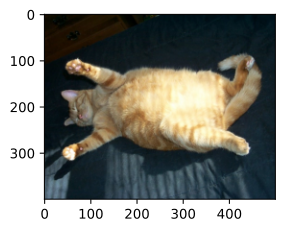
d2l.set_figsize()
img = Image.open('../img/cat1.jpg')
d2l.plt.imshow(img);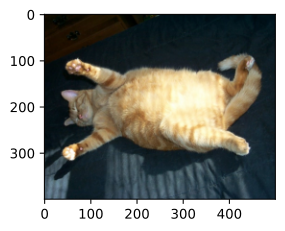
from PIL import Image
d2l.set_figsize()
img = Image.open('../img/cat1.jpg')
d2l.plt.imshow(img);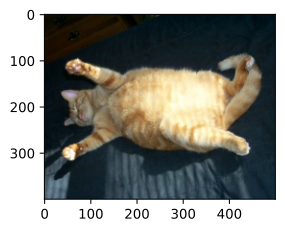
d2l.set_figsize()
img = image.imread('../img/cat1.jpg')
d2l.plt.imshow(img.asnumpy());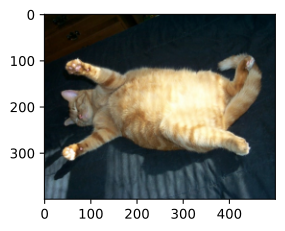
Most image augmentation methods have a certain degree of randomness. To make it easier for us to observe the effect of image augmentation, next we define an auxiliary function apply. This function runs the image augmentation method aug multiple times on the input image img and shows all the results.
def apply(img, aug, num_rows=2, num_cols=4, scale=1.5):
    Y = [aug(img) for _ in range(num_rows * num_cols)]
    d2l.show_images(Y, num_rows, num_cols, scale=scale)
20.1.1.1 Flipping and Cropping
Flipping the image left and right usually does not change the category of the object. This is one of the earliest and most widely used methods of image augmentation. Next, we use the transforms module to create the RandomHorizontalFlip instance, which flips an image left and right with a 50% chance.
Flipping the image left and right usually does not change the category of the object. This is one of the earliest and most widely used methods of image augmentation. Next, we define a RandomHorizontalFlip function using tf.image, which flips an image left and right with a 50% chance. We convert between PIL images and TensorFlow tensors as needed.
Flipping the image left and right usually does not change the category of the object. This is one of the earliest and most widely used methods of image augmentation. Next, we define a RandomHorizontalFlip function using tf.image, which flips an image left and right with a 50% chance. We convert between PIL images and TensorFlow tensors as needed.
Flipping the image left and right usually does not change the category of the object. This is one of the earliest and most widely used methods of image augmentation. Next, we use the transforms module to create the RandomFlipLeftRight instance, which flips an image left and right with a 50% chance.
apply(img, torchvision.transforms.RandomHorizontalFlip())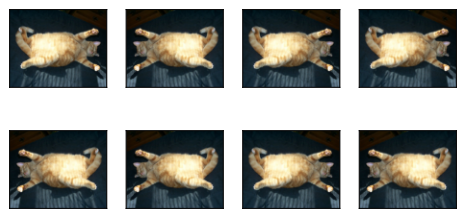
def RandomHorizontalFlip():
    def aug(img):
        img_tf = tf.constant(np.array(img))
        img_tf = tf.image.random_flip_left_right(img_tf)
        return Image.fromarray(img_tf.numpy())
    return aug

apply(img, RandomHorizontalFlip())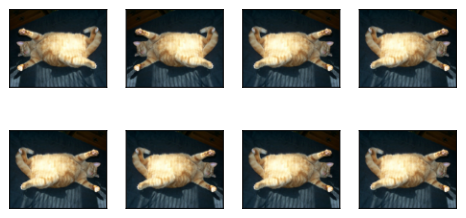
def RandomHorizontalFlip():
    def aug(img):
        img_tf = tf.constant(np.array(img))
        img_tf = tf.image.random_flip_left_right(img_tf)
        return Image.fromarray(img_tf.numpy())
    return aug

apply(img, RandomHorizontalFlip())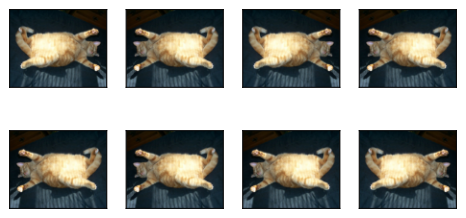
apply(img, gluon.data.vision.transforms.RandomFlipLeftRight())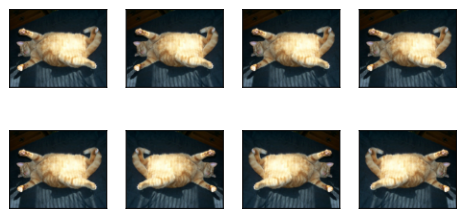
Flipping up and down is not as common as flipping left and right. But at least for this example image, flipping up and down does not hinder recognition. Next, we create a RandomVerticalFlip instance to flip an image up and down with a 50% chance.
Flipping up and down is not as common as flipping left and right. But at least for this example image, flipping up and down does not hinder recognition. Next, we create a RandomVerticalFlip function to flip an image up and down with a 50% chance.
Flipping up and down is not as common as flipping left and right. But at least for this example image, flipping up and down does not hinder recognition. Next, we create a RandomVerticalFlip function to flip an image up and down with a 50% chance.
Flipping up and down is not as common as flipping left and right. But at least for this example image, flipping up and down does not hinder recognition. Next, we create a RandomFlipTopBottom instance to flip an image up and down with a 50% chance.
apply(img, torchvision.transforms.RandomVerticalFlip())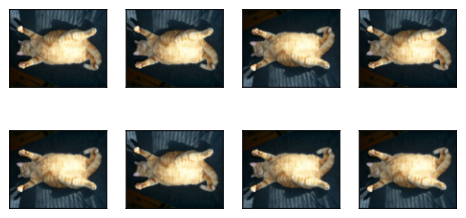
def RandomVerticalFlip():
    def aug(img):
        img_tf = tf.constant(np.array(img))
        img_tf = tf.image.random_flip_up_down(img_tf)
        return Image.fromarray(img_tf.numpy())
    return aug

apply(img, RandomVerticalFlip())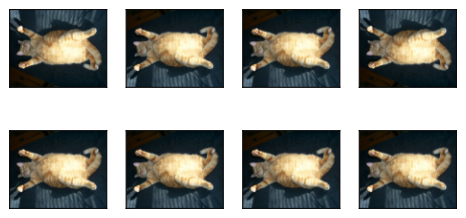
def RandomVerticalFlip():
    def aug(img):
        img_tf = tf.constant(np.array(img))
        img_tf = tf.image.random_flip_up_down(img_tf)
        return Image.fromarray(img_tf.numpy())
    return aug

apply(img, RandomVerticalFlip())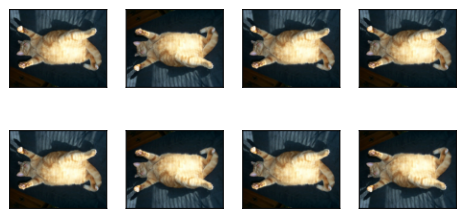
apply(img, gluon.data.vision.transforms.RandomFlipTopBottom())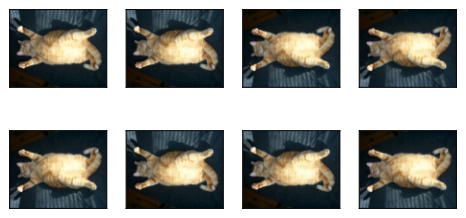
In the example image we used, the cat is in the middle of the image, but this may not be the case in general. In Section 6.5, we explained that the pooling layer can reduce the sensitivity of a convolutional layer to the target position. In addition, we can also randomly crop the image to make objects appear in different positions in the image at different scales, which can also reduce the sensitivity of a model to the target position.
In the code below, we randomly crop an area with an area of \(10\% \sim 100\%\) of the original area each time, and the ratio of width to height of this area is randomly selected from \(0.5 \sim 2\). Then, the width and height of the region are both scaled to 200 pixels. Unless otherwise specified, the random number between \(a\) and \(b\) in this section refers to a continuous value obtained by random and uniform sampling from the interval \([a, b]\).
shape_aug = torchvision.transforms.RandomResizedCrop(
    (200, 200), scale=(0.1, 1), ratio=(0.5, 2))
apply(img, shape_aug)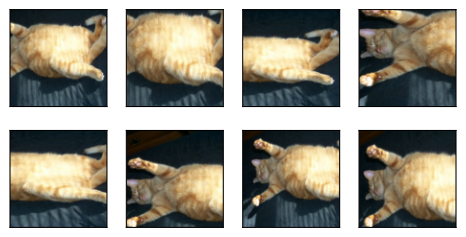
def RandomResizedCrop(size, scale=(0.1, 1), ratio=(0.5, 2)):
    target_h, target_w = size
    def aug(img):
        img_tf = tf.constant(np.array(img))
        h, w = tf.shape(img_tf)[0], tf.shape(img_tf)[1]
        area = tf.cast(h * w, tf.float32)
        log_ratio = (tf.math.log(float(ratio[0])), tf.math.log(float(ratio[1])))
        target_area = tf.random.uniform([], scale[0], scale[1]) * area
        aspect = tf.exp(tf.random.uniform([], log_ratio[0], log_ratio[1]))
        crop_h = tf.cast(tf.round(tf.sqrt(target_area / aspect)), tf.int32)
        crop_w = tf.cast(tf.round(tf.sqrt(target_area * aspect)), tf.int32)
        crop_h = tf.minimum(crop_h, h)
        crop_w = tf.minimum(crop_w, w)
        offset_h = tf.random.uniform([], 0, h - crop_h + 1, dtype=tf.int32)
        offset_w = tf.random.uniform([], 0, w - crop_w + 1, dtype=tf.int32)
        img_tf = tf.image.crop_to_bounding_box(img_tf, offset_h, offset_w,
                                                crop_h, crop_w)
        img_tf = tf.cast(img_tf, tf.float32)
        img_tf = tf.image.resize(img_tf, [target_h, target_w])
        img_tf = tf.cast(img_tf, tf.uint8)
        return Image.fromarray(img_tf.numpy())
    return aug

shape_aug = RandomResizedCrop((200, 200), scale=(0.1, 1), ratio=(0.5, 2))
apply(img, shape_aug)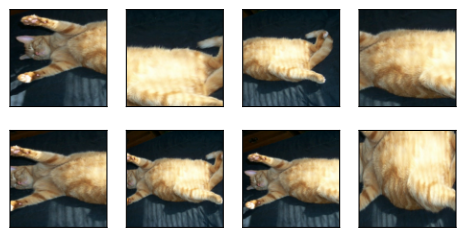
def RandomResizedCrop(size, scale=(0.1, 1), ratio=(0.5, 2)):
    target_h, target_w = size
    def aug(img):
        img_tf = tf.constant(np.array(img))
        h, w = tf.shape(img_tf)[0], tf.shape(img_tf)[1]
        area = tf.cast(h * w, tf.float32)
        log_ratio = (tf.math.log(float(ratio[0])), tf.math.log(float(ratio[1])))
        target_area = tf.random.uniform([], scale[0], scale[1]) * area
        aspect = tf.exp(tf.random.uniform([], log_ratio[0], log_ratio[1]))
        crop_h = tf.cast(tf.round(tf.sqrt(target_area / aspect)), tf.int32)
        crop_w = tf.cast(tf.round(tf.sqrt(target_area * aspect)), tf.int32)
        crop_h = tf.minimum(crop_h, h)
        crop_w = tf.minimum(crop_w, w)
        offset_h = tf.random.uniform([], 0, h - crop_h + 1, dtype=tf.int32)
        offset_w = tf.random.uniform([], 0, w - crop_w + 1, dtype=tf.int32)
        img_tf = tf.image.crop_to_bounding_box(img_tf, offset_h, offset_w,
                                                crop_h, crop_w)
        img_tf = tf.cast(img_tf, tf.float32)
        img_tf = tf.image.resize(img_tf, [target_h, target_w])
        img_tf = tf.cast(img_tf, tf.uint8)
        return Image.fromarray(img_tf.numpy())
    return aug

shape_aug = RandomResizedCrop((200, 200), scale=(0.1, 1), ratio=(0.5, 2))
apply(img, shape_aug)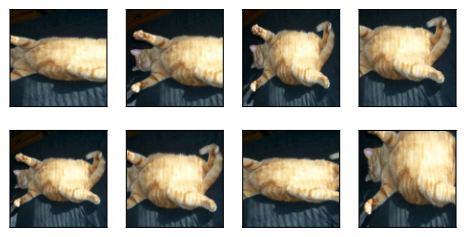
shape_aug = gluon.data.vision.transforms.RandomResizedCrop(
    (200, 200), scale=(0.1, 1), ratio=(0.5, 2))
apply(img, shape_aug)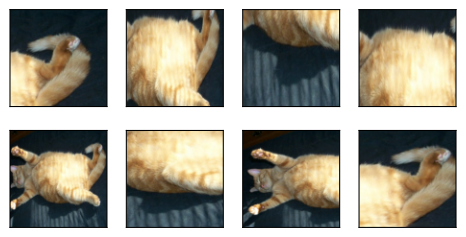
20.1.1.2 Changing Colors
Another augmentation method is changing colors. We can change four aspects of the image color: brightness, contrast, saturation, and hue. In the example below, we randomly change the brightness of the image to a value between 50% (\(1-0.5\)) and 150% (\(1+0.5\)) of the original image.
apply(img, torchvision.transforms.ColorJitter(
    brightness=0.5, contrast=0, saturation=0, hue=0))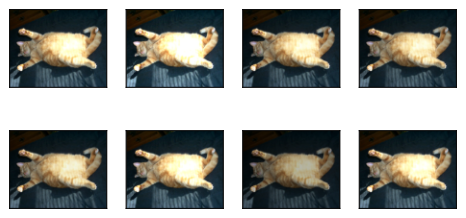
def RandomBrightness(max_delta):
    def aug(img):
        img_tf = tf.cast(tf.constant(np.array(img)), tf.float32) / 255.0
        img_tf = tf.image.random_brightness(img_tf, max_delta)
        img_tf = tf.clip_by_value(img_tf, 0.0, 1.0)
        return Image.fromarray((img_tf.numpy() * 255).astype(np.uint8))
    return aug

apply(img, RandomBrightness(0.5))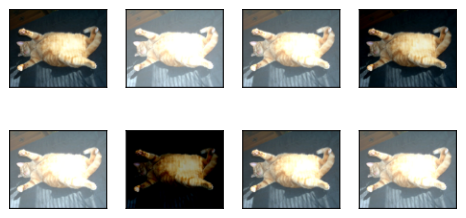
def RandomBrightness(max_delta):
    def aug(img):
        img_tf = tf.cast(tf.constant(np.array(img)), tf.float32) / 255.0
        img_tf = tf.image.random_brightness(img_tf, max_delta)
        img_tf = tf.clip_by_value(img_tf, 0.0, 1.0)
        return Image.fromarray((img_tf.numpy() * 255).astype(np.uint8))
    return aug

apply(img, RandomBrightness(0.5))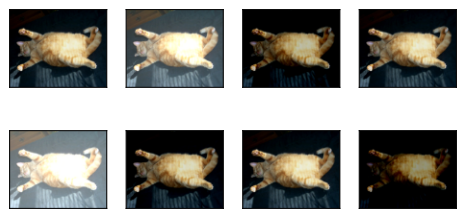
apply(img, gluon.data.vision.transforms.RandomBrightness(0.5))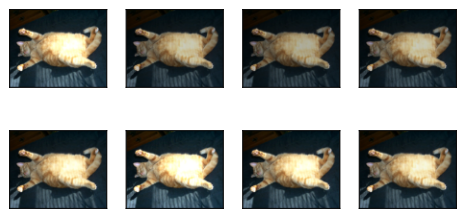
Similarly, we can randomly change the hue of the image.
apply(img, torchvision.transforms.ColorJitter(
    brightness=0, contrast=0, saturation=0, hue=0.5))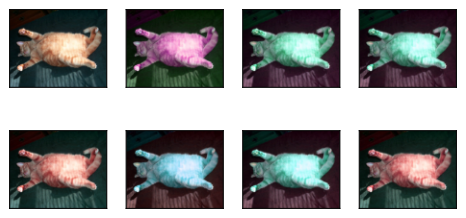
def RandomHue(max_delta):
    def aug(img):
        img_tf = tf.cast(tf.constant(np.array(img)), tf.float32) / 255.0
        img_tf = tf.image.random_hue(img_tf, max_delta)
        img_tf = tf.clip_by_value(img_tf, 0.0, 1.0)
        return Image.fromarray((img_tf.numpy() * 255).astype(np.uint8))
    return aug

apply(img, RandomHue(0.5))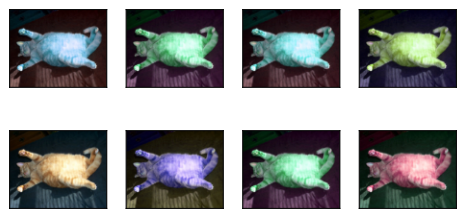
def RandomHue(max_delta):
    def aug(img):
        img_tf = tf.cast(tf.constant(np.array(img)), tf.float32) / 255.0
        img_tf = tf.image.random_hue(img_tf, max_delta)
        img_tf = tf.clip_by_value(img_tf, 0.0, 1.0)
        return Image.fromarray((img_tf.numpy() * 255).astype(np.uint8))
    return aug

apply(img, RandomHue(0.5))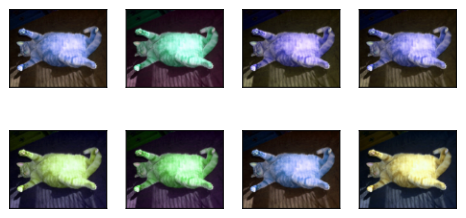
apply(img, gluon.data.vision.transforms.RandomHue(0.5))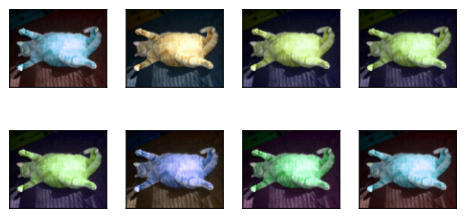
We can also create a RandomColorJitter instance and set how to randomly change the brightness, contrast, saturation, and hue of the image at the same time.
color_aug = torchvision.transforms.ColorJitter(
    brightness=0.5, contrast=0.5, saturation=0.5, hue=0.5)
apply(img, color_aug)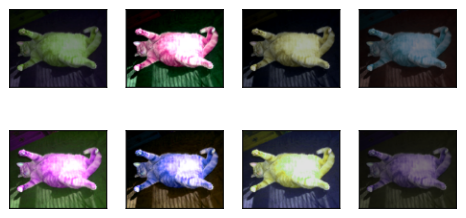
def RandomColorJitter(brightness=0, contrast=0, saturation=0, hue=0):
    def aug(img):
        img_tf = tf.cast(tf.constant(np.array(img)), tf.float32) / 255.0
        if brightness > 0:
            img_tf = tf.image.random_brightness(img_tf, brightness)
        if contrast > 0:
            img_tf = tf.image.random_contrast(img_tf, 1 - contrast,
                                              1 + contrast)
        if saturation > 0:
            img_tf = tf.image.random_saturation(img_tf, 1 - saturation,
                                                1 + saturation)
        if hue > 0:
            img_tf = tf.image.random_hue(img_tf, hue)
        img_tf = tf.clip_by_value(img_tf, 0.0, 1.0)
        return Image.fromarray((img_tf.numpy() * 255).astype(np.uint8))
    return aug

color_aug = RandomColorJitter(brightness=0.5, contrast=0.5, saturation=0.5,
                              hue=0.5)
apply(img, color_aug)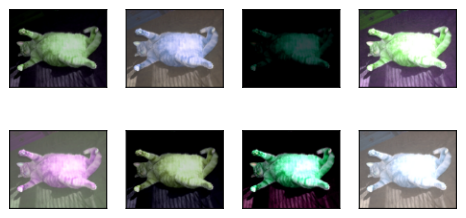
def RandomColorJitter(brightness=0, contrast=0, saturation=0, hue=0):
    def aug(img):
        img_tf = tf.cast(tf.constant(np.array(img)), tf.float32) / 255.0
        if brightness > 0:
            img_tf = tf.image.random_brightness(img_tf, brightness)
        if contrast > 0:
            img_tf = tf.image.random_contrast(img_tf, 1 - contrast,
                                              1 + contrast)
        if saturation > 0:
            img_tf = tf.image.random_saturation(img_tf, 1 - saturation,
                                                1 + saturation)
        if hue > 0:
            img_tf = tf.image.random_hue(img_tf, hue)
        img_tf = tf.clip_by_value(img_tf, 0.0, 1.0)
        return Image.fromarray((img_tf.numpy() * 255).astype(np.uint8))
    return aug

color_aug = RandomColorJitter(brightness=0.5, contrast=0.5, saturation=0.5,
                              hue=0.5)
apply(img, color_aug)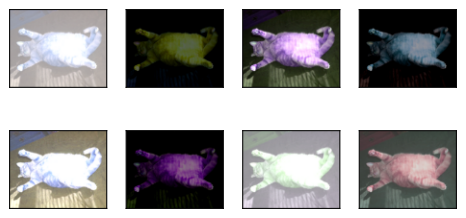
color_aug = gluon.data.vision.transforms.RandomColorJitter(
    brightness=0.5, contrast=0.5, saturation=0.5, hue=0.5)
apply(img, color_aug)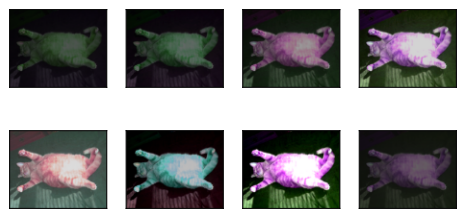
20.1.1.3 Combining Multiple Image Augmentation Methods
In practice, we will combine multiple image augmentation methods. For example, we can combine the different image augmentation methods defined above and apply them to each image via a Compose instance.
augs = torchvision.transforms.Compose([
    torchvision.transforms.RandomHorizontalFlip(), color_aug, shape_aug])
apply(img, augs)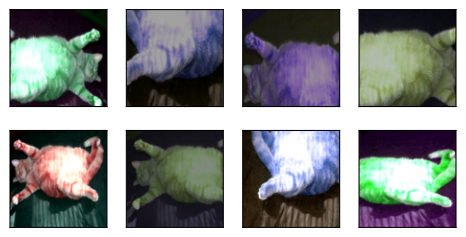
def Compose(transforms):
    def aug(img):
        for t in transforms:
            img = t(img)
        return img
    return aug

augs = Compose([RandomHorizontalFlip(), color_aug, shape_aug])
apply(img, augs)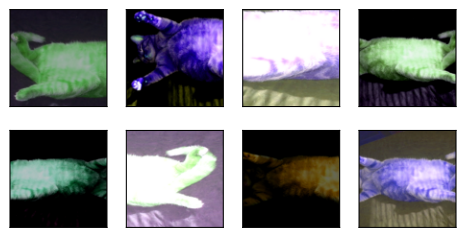
def Compose(transforms):
    def aug(img):
        for t in transforms:
            img = t(img)
        return img
    return aug

augs = Compose([RandomHorizontalFlip(), color_aug, shape_aug])
apply(img, augs)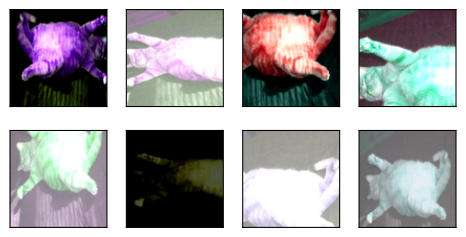
augs = gluon.data.vision.transforms.Compose([
    gluon.data.vision.transforms.RandomFlipLeftRight(), color_aug, shape_aug])
apply(img, augs)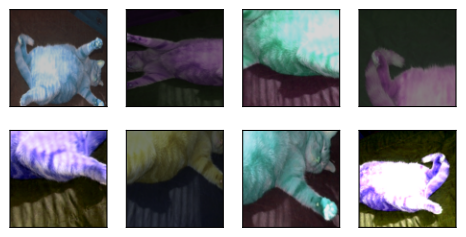
20.1.2 Training with Image Augmentation
Let’s train a model with image augmentation. Here we use the CIFAR-10 dataset instead of the Fashion-MNIST dataset that we used before. This is because the position and size of the objects in the Fashion-MNIST dataset have been normalized, while the color and size of the objects in the CIFAR-10 dataset have more significant differences. The first 32 training images in the CIFAR-10 dataset are shown below.
all_images = torchvision.datasets.CIFAR10(train=True, root="../data",
                                          download=True)
d2l.show_images([all_images[i][0] for i in range(32)], 4, 8, scale=0.8);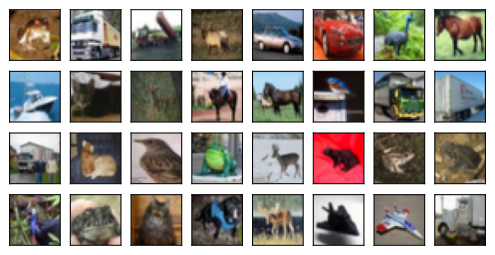
(train_images, train_labels), _ = keras.datasets.cifar10.load_data()
d2l.show_images([Image.fromarray(train_images[i]) for i in range(32)],
                4, 8, scale=0.8);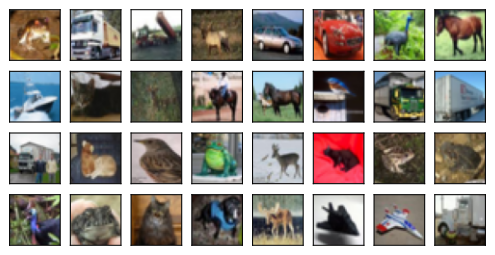
(train_images, train_labels), _ = tf.keras.datasets.cifar10.load_data()
d2l.show_images([Image.fromarray(train_images[i]) for i in range(32)],
                4, 8, scale=0.8);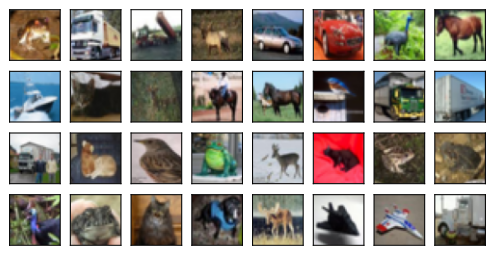
d2l.show_images(gluon.data.vision.CIFAR10(
    train=True)[:32][0], 4, 8, scale=0.8);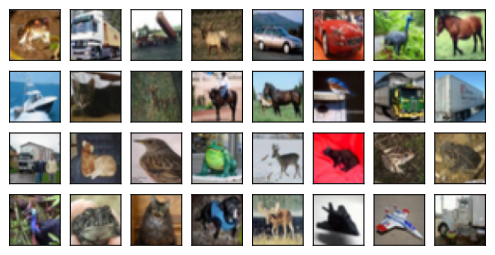
In order to obtain definitive results during prediction, we usually only apply image augmentation to training examples, and do not use image augmentation with random operations during prediction. Here we only use the simplest random left-right flipping method. In addition, we use a ToTensor instance to convert a minibatch of images into the format required by the deep learning framework, i.e., 32-bit floating point numbers between 0 and 1 with the shape of (batch size, number of channels, height, width).
train_augs = torchvision.transforms.Compose([
     torchvision.transforms.RandomHorizontalFlip(),
     torchvision.transforms.ToTensor()])

test_augs = torchvision.transforms.Compose([
     torchvision.transforms.ToTensor()])
def train_augs(image, label):
image = tf.cast(image, tf.float32) / 255.0
image = tf.image.random_flip_left_right(image)
return image, label
def test_augs(image, label):
image = tf.cast(image, tf.float32) / 255.0
return image, labeldef train_augs(image, label):
image = tf.cast(image, tf.float32) / 255.0
image = tf.image.random_flip_left_right(image)
return image, label
def test_augs(image, label):
image = tf.cast(image, tf.float32) / 255.0
return image, labeltrain_augs = gluon.data.vision.transforms.Compose([
gluon.data.vision.transforms.RandomFlipLeftRight(),
gluon.data.vision.transforms.ToTensor()])
test_augs = gluon.data.vision.transforms.Compose([
gluon.data.vision.transforms.ToTensor()])Next, we define an auxiliary function to facilitate reading the image and applying image augmentation. The transform argument provided by PyTorch’s dataset applies augmentation to transform the images. For a detailed introduction to DataLoader, please refer to Section 3.2.
Next, we define an auxiliary function to facilitate reading the image and applying image augmentation. We use keras.datasets to load CIFAR-10 and tf.data.Dataset for batching and preprocessing. For a detailed introduction to data loading, please refer to Section 3.2.
Next, we define an auxiliary function to facilitate reading the image and applying image augmentation. We use tf.keras.datasets to load CIFAR-10 and tf.data.Dataset for batching, then convert each batch to NumPy arrays via as_numpy_iterator() for use with JAX. For a detailed introduction to data loading, please refer to Section 3.2.
Next, we define an auxiliary function to facilitate reading the image and applying image augmentation. The transform_first function provided by Gluon’s datasets applies image augmentation to the first element of each training example (image and label), i.e., the image. For a detailed introduction to DataLoader, please refer to Section 3.2.
def load_cifar10(is_train, augs, batch_size):
    dataset = torchvision.datasets.CIFAR10(root="../data", train=is_train,
                                           transform=augs, download=True)
    dataloader = torch.utils.data.DataLoader(dataset, batch_size=batch_size,
                    shuffle=is_train, num_workers=d2l.get_dataloader_workers())
    return dataloader
def load_cifar10(is_train, aug_fn, batch_size):
(train_imgs, train_lbls), (test_imgs, test_lbls) = (
keras.datasets.cifar10.load_data())
if is_train:
images, labels = train_imgs, train_lbls.squeeze()
else:
images, labels = test_imgs, test_lbls.squeeze()
ds = tf.data.Dataset.from_tensor_slices((images, labels))
if is_train:
ds = ds.shuffle(10000)
ds = ds.map(aug_fn, num_parallel_calls=tf.data.AUTOTUNE)
ds = ds.batch(batch_size).prefetch(tf.data.AUTOTUNE)
return dsdef load_cifar10(is_train, aug_fn, batch_size):
(train_imgs, train_lbls), (test_imgs, test_lbls) = (
tf.keras.datasets.cifar10.load_data())
if is_train:
images, labels = train_imgs, train_lbls.squeeze()
else:
images, labels = test_imgs, test_lbls.squeeze()
ds = tf.data.Dataset.from_tensor_slices((images, labels))
if is_train:
ds = ds.shuffle(10000)
ds = ds.map(aug_fn, num_parallel_calls=tf.data.AUTOTUNE)
ds = ds.batch(batch_size).prefetch(tf.data.AUTOTUNE)
return dsdef load_cifar10(is_train, augs, batch_size):
return gluon.data.DataLoader(
gluon.data.vision.CIFAR10(train=is_train).transform_first(augs),
batch_size=batch_size, shuffle=is_train,
num_workers=d2l.get_dataloader_workers())20.1.2.1 Multi-GPU Training
We train the ResNet-18 model from Section 7.4 on the CIFAR-10 dataset. Recall the introduction to multi-GPU training in Section 13.6. In the following, we define a function to train and evaluate the model using multiple GPUs.
def train_batch_ch13(net, X, y, loss, trainer, devices):
    """Train for a minibatch with multiple GPUs (defined in Chapter 13)."""
    if isinstance(X, list):
        # Required for BERT fine-tuning (to be covered later)
        X = [x.to(devices[0]) for x in X]
    else:
        X = X.to(devices[0])
    y = y.to(devices[0])
    net.train()
    trainer.zero_grad()
    pred = net(X)
    l = loss(pred, y)
    l.sum().backward()
    trainer.step()
    train_loss_sum = l.sum() if l.numel() > 1 else l * y.numel()
    train_acc_sum = d2l.accuracy(pred, y)
    return train_loss_sum, train_acc_sum
def train_batch_ch13(net, X, y, loss, optimizer):
    """Train for a minibatch with Keras (defined in Chapter 13)."""
    with tf.GradientTape() as tape:
        pred = net(X, training=True)
        l = loss(y, pred)
    grads = tape.gradient(l, net.trainable_variables)
    optimizer.apply_gradients(zip(grads, net.trainable_variables))
    train_loss_sum = tf.reduce_sum(l)
    train_acc_sum = tf.reduce_sum(
        tf.cast(tf.argmax(pred, axis=1) == tf.cast(y, tf.int64), tf.float32))
    return train_loss_sum, train_acc_sum
@nnx.jit
def train_batch_ch13(net, optimizer, X, y):
    """Train for a minibatch with JAX (defined in Chapter 13)."""
    def compute_loss(model):
        logits = model(X)
        loss = optax.softmax_cross_entropy_with_integer_labels(
            logits, y).mean()
        return loss, logits
    (loss, logits), grads = nnx.value_and_grad(
        compute_loss, has_aux=True)(net)
    optimizer.update(net, grads)
    train_loss_sum = loss * X.shape[0]
    train_acc_sum = (logits.argmax(axis=-1) == y).sum()
    return train_loss_sum, train_acc_sum
def train_batch_ch13(net, features, labels, loss, trainer, devices,
                     split_f=d2l.split_batch):
    """Train for a minibatch with multiple GPUs (defined in Chapter 13)."""
    X_shards, y_shards = split_f(features, labels, devices)
    with autograd.record():
        pred_shards = [net(X_shard) for X_shard in X_shards]
        ls = [loss(pred_shard, y_shard) for pred_shard, y_shard
              in zip(pred_shards, y_shards)]
    for l in ls:
        l.backward()
    # The `True` flag allows parameters with stale gradients, which is useful
    # later (e.g., in fine-tuning BERT). `1` (not `labels.shape[0]`) so the raw
    # sum-gradient is applied — matches PyTorch's `trainer.step()` semantics.
    trainer.step(1, ignore_stale_grad=True)
    train_loss_sum = sum([float(l.sum()) for l in ls])
    train_acc_sum = sum(d2l.accuracy(pred_shard, y_shard)
                        for pred_shard, y_shard in zip(pred_shards, y_shards))
return train_loss_sum, train_acc_sumdef train_ch13(net, train_iter, test_iter, loss, trainer, num_epochs,
devices=d2l.try_all_gpus()):
"""Train a model with multiple GPUs (defined in Chapter 13)."""
timer, num_batches = d2l.Timer(), len(train_iter)
animator = d2l.Animator(xlabel='epoch', xlim=[1, num_epochs], ylim=[0, 1],
legend=['train loss', 'train acc', 'test acc'])
net = nn.DataParallel(net, device_ids=devices).to(devices[0])
for epoch in range(num_epochs):
# Sum of training loss, sum of training accuracy, no. of examples,
# no. of examples
metric = d2l.Accumulator(4)
for i, (features, labels) in enumerate(train_iter):
timer.start()
l, acc = train_batch_ch13(
net, features, labels, loss, trainer, devices)
metric.add(l, acc, labels.shape[0], labels.numel())
timer.stop()
if (i + 1) % (num_batches // 5) == 0 or i == num_batches - 1:
animator.add(epoch + (i + 1) / num_batches,
(metric[0] / metric[2], metric[1] / metric[3],
None))
test_acc = d2l.evaluate_accuracy_gpu(net, test_iter)
animator.add(epoch + 1, (None, None, test_acc))
print(f'loss {metric[0] / metric[2]:.3f}, train acc '
f'{metric[1] / metric[3]:.3f}, test acc {test_acc:.3f}')
print(f'{metric[2] * num_epochs / timer.sum():.1f} examples/sec on '
f'{str(devices)}')
def train_ch13(net, train_iter, test_iter, loss, optimizer, num_epochs):
    """Train a model with Keras (defined in Chapter 13)."""
    num_batches = sum(1 for _ in train_iter)
    animator = d2l.Animator(xlabel='epoch', xlim=[1, num_epochs], ylim=[0, 1],
                            legend=['train loss', 'train acc', 'test acc'])
    timer = d2l.Timer()
    for epoch in range(num_epochs):
        # Sum of training loss, sum of training accuracy, no. of examples,
        # no. of examples
        metric = d2l.Accumulator(4)
        for i, (features, labels) in enumerate(train_iter):
            timer.start()
            l, acc = train_batch_ch13(net, features, labels, loss, optimizer)
            n = features.shape[0]
            metric.add(float(l), float(acc), n, n)
            timer.stop()
            if (i + 1) % (num_batches // 5) == 0 or i == num_batches - 1:
                animator.add(epoch + (i + 1) / num_batches,
                             (metric[0] / metric[2], metric[1] / metric[3],
                              None))
        # Evaluate on test set
        correct, total = 0, 0
        for X, y in test_iter:
            logits = net(X, training=False)
            correct += int(tf.reduce_sum(tf.cast(
                tf.argmax(logits, axis=1) == tf.cast(y, tf.int64),
                tf.float32)))
            total += y.shape[0]
        test_acc = correct / total
        animator.add(epoch + 1, (None, None, test_acc))
    print(f'loss {metric[0] / metric[2]:.3f}, train acc '
          f'{metric[1] / metric[3]:.3f}, test acc {test_acc:.3f}')
    print(f'{metric[2] * num_epochs / timer.sum():.1f} examples/sec')
def train_ch13(net, train_iter, test_iter, optimizer, num_epochs):
    """Train a model with JAX (defined in Chapter 13)."""
    num_batches = int(train_iter.cardinality().numpy())
    animator = d2l.Animator(xlabel='epoch', xlim=[1, num_epochs], ylim=[0, 1],
                            legend=['train loss', 'train acc', 'test acc'])
    timer = d2l.Timer()

    train_net = nnx.view(net, use_running_average=False,
                         raise_if_not_found=False)
    eval_net = nnx.view(net, use_running_average=True,
                        raise_if_not_found=False)

    @nnx.jit
    def eval_step(model, X):
        return model(X)

    for epoch in range(num_epochs):
        # Sum of training loss, sum of training accuracy, no. of examples,
        # no. of examples
        loss_sum = jnp.array(0.0)
        train_correct = jnp.array(0.0)
        num_examples = 0
        timer.start()
        for i, (features, labels) in enumerate(
                train_iter.as_numpy_iterator()):
            l, acc = train_batch_ch13(
                train_net, optimizer, jnp.array(features), jnp.array(labels))
            n = features.shape[0]
            loss_sum += l
            train_correct += acc
            num_examples += n
        # One transfer per epoch also waits for all dispatched training work,
        # keeping the throughput measurement meaningful without synchronizing
        # every minibatch.
        loss_sum, train_correct = jax.device_get((loss_sum, train_correct))
        timer.stop()
        # Evaluate on test set
        correct, total = jnp.array(0), 0
        for X, y in test_iter.as_numpy_iterator():
            logits = eval_step(eval_net, jnp.array(X))
            correct += (logits.argmax(axis=-1) == y).sum()
            total += y.shape[0]
        correct = int(jax.device_get(correct))
        train_loss = float(loss_sum) / num_examples
        train_acc = float(train_correct) / num_examples
        test_acc = correct / total
        animator.add(epoch + 1, (train_loss, train_acc, test_acc))
    print(f'loss {train_loss:.3f}, train acc '
          f'{train_acc:.3f}, test acc {test_acc:.3f}')
    print(f'{num_examples * num_epochs / timer.sum():.1f} examples/sec')
    return net
def train_ch13(net, train_iter, test_iter, loss, trainer, num_epochs,
               devices=d2l.try_all_gpus(), split_f=d2l.split_batch):
    """Train a model with multiple GPUs (defined in Chapter 13)."""
    timer, num_batches = d2l.Timer(), len(train_iter)
    animator = d2l.Animator(xlabel='epoch', xlim=[1, num_epochs], ylim=[0, 1],
                            legend=['train loss', 'train acc', 'test acc'])
    for epoch in range(num_epochs):
        # Sum of training loss, sum of training accuracy, no. of examples,
        # no. of examples
        metric = d2l.Accumulator(4)
        for i, (features, labels) in enumerate(train_iter):
            timer.start()
            l, acc = train_batch_ch13(
                net, features, labels, loss, trainer, devices, split_f)
            metric.add(l, acc, labels.shape[0], labels.size)
            timer.stop()
            if (i + 1) % (num_batches // 5) == 0 or i == num_batches - 1:
                animator.add(epoch + (i + 1) / num_batches,
                             (metric[0] / metric[2], metric[1] / metric[3],
                              None))
        test_acc = d2l.evaluate_accuracy_gpus(net, test_iter, split_f)
        animator.add(epoch + 1, (None, None, test_acc))
    print(f'loss {metric[0] / metric[2]:.3f}, train acc '
          f'{metric[1] / metric[3]:.3f}, test acc {test_acc:.3f}')
    print(f'{metric[2] * num_epochs / timer.sum():.1f} examples/sec on '
          f'{str(devices)}')
Now we can define the train_with_data_aug function to train the model with image augmentation. This function gets all available GPUs, uses Adam as the optimization algorithm, applies image augmentation to the training dataset, and finally calls the train_ch13 function just defined to train and evaluate the model.
batch_size, devices, net = 256, d2l.try_all_gpus(), d2l.resnet18(10, 3)
net.apply(d2l.init_cnn)

def train_with_data_aug(train_augs, test_augs, net, lr=0.001):
    train_iter = load_cifar10(True, train_augs, batch_size)
    test_iter = load_cifar10(False, test_augs, batch_size)
    loss = nn.CrossEntropyLoss(reduction="none")
    trainer = torch.optim.Adam(net.parameters(), lr=lr)
    net(next(iter(train_iter))[0])
    train_ch13(net, train_iter, test_iter, loss, trainer, 10, devices)
batch_size = 256
def get_net_tf():
return d2l.resnet18(10, 3)
def train_with_data_aug(train_aug_fn, test_aug_fn, net, lr=0.001):
train_iter = load_cifar10(True, train_aug_fn, batch_size)
test_iter = load_cifar10(False, test_aug_fn, batch_size)
loss = keras.losses.SparseCategoricalCrossentropy(
from_logits=True, reduction='none')
optimizer = keras.optimizers.Adam(learning_rate=lr)
train_ch13(net, train_iter, test_iter, loss, optimizer, 10)
net = get_net_tf()batch_size = 256
class ResNet18(nnx.Module):
def __init__(self, num_classes=10, rngs=None):
rngs = nnx.Rngs(d2l.get_key()) if rngs is None else rngs
self.net = nnx.Sequential(
nnx.Conv(3, 64, kernel_size=(3, 3), strides=(1, 1),
padding='same', rngs=rngs),
nnx.BatchNorm(64, rngs=rngs), nnx.relu,
d2l.Residual(64, in_channels=64, rngs=rngs),
d2l.Residual(64, in_channels=64, rngs=rngs),
d2l.Residual(128, use_1x1conv=True, strides=(2, 2),
in_channels=64, rngs=rngs),
d2l.Residual(128, in_channels=128, rngs=rngs),
d2l.Residual(256, use_1x1conv=True, strides=(2, 2),
in_channels=128, rngs=rngs),
d2l.Residual(256, in_channels=256, rngs=rngs),
d2l.Residual(512, use_1x1conv=True, strides=(2, 2),
in_channels=256, rngs=rngs),
d2l.Residual(512, in_channels=512, rngs=rngs),
lambda x: x.mean(axis=(1, 2)),
nnx.Linear(512, num_classes, rngs=rngs))
def __call__(self, x):
return self.net(x)
net = ResNet18(num_classes=10)
def train_with_data_aug(train_aug_fn, test_aug_fn, net, lr=0.001):
train_iter = load_cifar10(True, train_aug_fn, batch_size)
test_iter = load_cifar10(False, test_aug_fn, batch_size)
optimizer = nnx.Optimizer(net, optax.adam(lr), wrt=nnx.Param)
train_ch13(net, train_iter, test_iter, optimizer, 10)batch_size, devices, net = 256, d2l.try_all_gpus(), d2l.resnet18(10)
net.initialize(init=init.Xavier(), ctx=devices)
def train_with_data_aug(train_augs, test_augs, net, lr=0.001):
train_iter = load_cifar10(True, train_augs, batch_size)
test_iter = load_cifar10(False, test_augs, batch_size)
loss = gluon.loss.SoftmaxCrossEntropyLoss()
trainer = gluon.Trainer(net.collect_params(), 'adam',
{'learning_rate': lr})
train_ch13(net, train_iter, test_iter, loss, trainer, 10, devices)Let’s train the model using image augmentation based on random left-right flipping.
train_with_data_aug(train_augs, test_augs, net)loss 0.218, train acc 0.925, test acc 0.825
7055.8 examples/sec on [device(type='cuda', index=0)]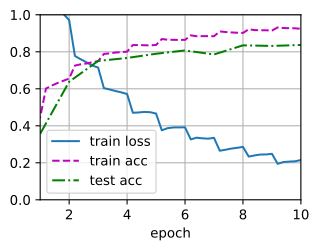
loss 0.180, train acc 0.937, test acc 0.809
759.0 examples/sec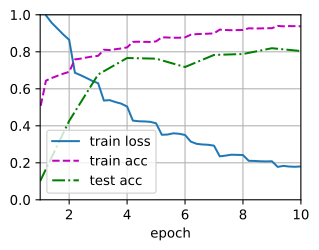
loss 0.161, train acc 0.944, test acc 0.798
506.4 examples/sec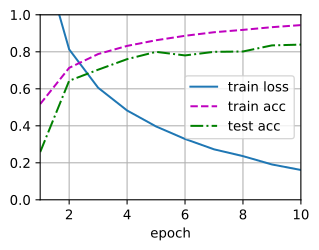
loss 0.161, train acc 0.945, test acc 0.851
2020.0 examples/sec on [gpu(0)]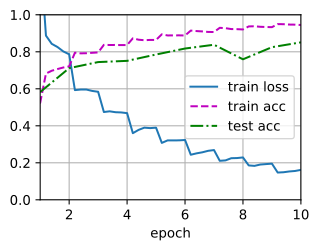
20.1.3 Summary
- Image augmentation generates random images based on existing training data to improve the generalization ability of models.
- In order to obtain definitive results during prediction, we usually only apply image augmentation to training examples, and do not use image augmentation with random operations during prediction.
- Deep learning frameworks provide many different image augmentation methods, which can be applied simultaneously.
20.1.4 Exercises
- Train the model without using image augmentation:
train_with_data_aug(test_augs, test_augs). Compare training and testing accuracy when using and not using image augmentation. Can this comparative experiment support the argument that image augmentation can mitigate overfitting? Why? - Combine multiple different image augmentation methods in model training on the CIFAR-10 dataset. Does it improve test accuracy?
- Refer to the online documentation of the deep learning framework. What other image augmentation methods does it also provide?