import os

resource = {
    "cpu_count_visible": os.cpu_count(),
    "colab": "COLAB_RELEASE_TAG" in os.environ,
    "kaggle": "KAGGLE_KERNEL_RUN_TYPE" in os.environ,
}
resource30.2 Colab and Kaggle
Google Colab and Kaggle provide browser-based notebooks on temporary virtual machines, with limited free access to accelerators when available. They allow readers to run the book without a local installation, including from devices on which installing development software is impractical. Availability and usage limits vary, so resource requirements must still be checked for each notebook.
The provider controls the runtime. It creates a temporary machine with a browser editor, a Python environment, and possibly an accelerator. When the session ends because of an idle or usage limit, the machine and files written only to its local disk disappear. Your notebook and any artifacts you explicitly saved survive; nothing else does.
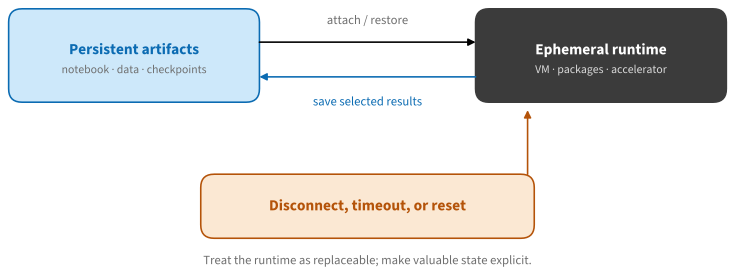
The lifecycle in Figure 30.2.1 explains the principal failure modes of hosted notebooks. A runtime may stop after inactivity, hit a session limit, or come back with a different software image. Conversely, rerunning a setup cell has little overhead when the notebook records everything needed to reconstruct the runtime — which is exactly how the notebooks in this book are written.
30.2.1 Launching a Book Notebook
Every code-bearing page of the book has a Run notebook control that follows the active framework tab: framework-specific pages offer PyTorch, TensorFlow, or JAX; framework-independent pages use a single NumPy notebook. The generated notebooks live at a stable path on a public GitHub branch and record the exact source revision they were built from.
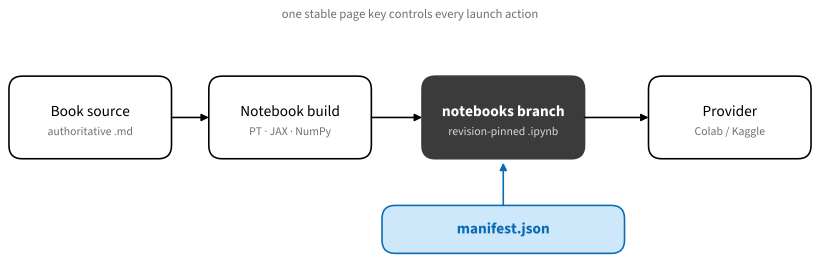
The launch buttons use different persistence models:
- Colab opens a pointer to GitHub. The URL has the form
colab.research.google.com/github/<org>/<repo>/blob/<branch>/<path>.ipynb, and Colab fetches the notebook from GitHub each time it is opened. You see the current published version — but your edits are not written back. To keep changes, use File → Save a copy in Drive (or download the.ipynb). - Kaggle imports a copy. The book passes the notebook’s raw URL to Kaggle’s importer (
kaggle.com/kernels/welcome?src=...), which creates a new private scratchpad in your Kaggle account containing that notebook. You can inspect it without signing in; editing and running require an account. Your copy is now independent of the book — it will not update when the book does, and keeping your changes means saving a version on Kaggle.
In short: Colab launches a live view of the repository, Kaggle clones a snapshot into your workspace. Either way, the launch button never uploads an arbitrary local file — it refers to a readable notebook at a stable public path, which you can and should inspect before running. Treat that as a habit for any “open in Colab” badge on the internet: check the repository origin and the setup cell before executing someone else’s code on your account.
30.2.2 Colab
30.2.2.1 Free-Tier Resources
Colab’s free tier provides access to GPUs and TPUs, but its official FAQ does not guarantee particular hardware, memory, or session duration. These limits vary with demand, usage history, and product policy; a T4 with 16 GB has been a common allocation, but it is not a service guarantee. Verify the assigned hardware at runtime. Colab also integrates an assistant for writing and debugging notebook code.
Do not infer the hardware from the menu — verify it in code:
{'cpu_count_visible': 64, 'colab': False, 'kaggle': False}For PyTorch, check torch.cuda.is_available() and torch.cuda.get_device_properties(0); for TensorFlow, tf.config.list_physical_devices("GPU"); for JAX, jax.devices(). A reported accelerator is still not a guarantee that your workload fits its memory.
When the free tier is insufficient, Colab offers paid plans and pay-as-you-go compute units. Unit prices, accelerator consumption rates, and plan features change, so consult the purchase dialog and current FAQ before estimating cost. A compute-unit balance increases access but does not guarantee a particular accelerator.
Two additional features affect reproducibility and automation. Pinned runtime versions let a notebook request a dated environment image, taming the “worked yesterday, broke today” package drift that plagues hosted runtimes. And the Colab CLI (colab exec, colab repl) drives the same runtimes from a terminal or a coding agent, which makes Colab usable as a scriptable free GPU rather than only an interactive page.
30.2.2.2 Saving Work
Colab is Drive-centric: Save a copy in Drive is the persistence story, and Google Drive mounts (drive.mount) are the common way to keep datasets and checkpoints across sessions. A notebook opened from GitHub is never saved back automatically. Colab can also attach to a local runtime — the browser UI controlling a Jupyter server on your own machine — which changes the security boundary completely: the notebook then executes with the permissions of your local Jupyter process. Connect only notebooks you trust.
30.2.3 Kaggle
30.2.3.1 A Data-Centric Model
Where Colab orbits Drive, Kaggle orbits datasets and competitions, and its notebook product reflects that. Three directories define the mental model:
/kaggle/input/holds attached datasets and models, mounted read-only and versioned. Attaching an existing dataset is instant and costs no download time or quota./kaggle/working/is your writable output directory (about 20 GB); its contents persist only into saved versions of the notebook.- everything else is scratch that disappears with the session.
The second defining feature is versioning. Save & Run All executes the whole notebook top to bottom in a fresh session and stores the result as an immutable, named version — inputs, code, outputs, and logs. This is restart and run all (Section 30.1) elevated to a platform primitive, and it is why Kaggle notebooks attached to competitions are reproducible in a way ad-hoc notebooks rarely are.
30.2.3.2 Quotas and Hardware
Kaggle displays accelerator quotas and session limits in the notebook interface. In the mid-2026 snapshot used for this chapter, accounts received roughly 30 GPU-hours per week on a P100 or a 2×T4 machine, about 20 TPU-hours per week, sessions of up to 12 hours, and around 30 GB of RAM. These values are account- and policy-dependent and must be checked before planning a run. Phone verification may be required to enable accelerators or internet access. Internet access is a per-notebook setting and is disabled in some competitions, so a well-behaved notebook attaches data as inputs rather than downloading it mid-run. The Kaggle CLI can push, run, and pull notebooks and datasets from your terminal; keep its token in the provider’s secret store, never in a cell.
30.2.4 Choosing and Working Portably
30.2.4.1 Colab or Kaggle?
| Need | Colab | Kaggle |
|---|---|---|
| Open a GitHub notebook directly | Yes — live fetch per open | Import creates your own copy |
| Free GPU | T4; limits opaque, demand-driven | P100 or 2×T4; ~30 h/week published |
| Predictable quota | No | Yes |
| Persistent files | Google Drive | Versioned datasets and outputs |
| Reproducible runs | Manual restart-and-run-all | Save & Run All versions |
| Competition workflow | External | Native |
| Paid upgrade path | Compute units, Pro/Pro+ | None needed — quota is fixed |
Data location is an important selection criterion. For running a book section, Colab’s direct GitHub opening is the shortest path. For a dataset-centered experiment you want to share or rerun reproducibly, Kaggle’s versioned inputs and outputs are more natural. For long training runs, private data, or guaranteed hardware, use a machine you control — the subject of Section 30.3.
30.2.4.2 Setup Cells That Survive
Because the runtime is replaceable, the notebook must carry its own setup. A good setup cell is short, idempotent, and explicit: it pins revisions, installs only what is missing, and contains no secrets.
import importlib.util
import platform

required = ["numpy", "matplotlib"]
missing = [name for name in required
           if importlib.util.find_spec(name) is None]
{
    "python": platform.python_version(),
    "missing": missing,
    "reconstructible": not missing,
}
{'python': '3.12.3', 'missing': [], 'reconstructible': True}Avoid an unconditional pip install --upgrade ... at the top of a notebook: it discards a tested provider environment, slows every start, and makes yesterday’s notebook resolve different packages today. Install the specific missing package at a pinned version instead. Since a provider image can change under an unmodified notebook, printing a small environment fingerprint makes results interpretable and bug reports useful:
import json
import numpy as np

fingerprint = {
    "python": platform.python_version(),
    "numpy": np.__version__,
    "machine": platform.machine(),
}
print(json.dumps(fingerprint, indent=2))
{
"python": "3.12.3",
"numpy": "2.4.4",
"machine": "x86_64"
}Portable notebooks also avoid hard-coding provider paths. Isolate provider-specific paths in a small adapter and use pathlib for the remaining file operations:
from pathlib import Path

if Path("/kaggle/working").exists():
    work = Path("/kaggle/working")
elif Path("/content").exists():
    work = Path("/content")
else:
    work = Path.cwd()
workPosixPath('/home/smola/d2l-neu/_notebooks/pytorch/chapter_appendix-tools-for-deep-learning')Finally, secrets: both providers offer a secret manager for API tokens. Use it. Never print a token, store it in an output, or commit it in a saved copy — a public notebook is an executable publication, and its outputs are part of what you publish.
30.2.5 Summary
- Colab and Kaggle provide limited free notebook runtimes; accelerator availability is not guaranteed, so inspect the assigned runtime before use.
- The launch buttons differ: Colab opens a live pointer to the notebook on GitHub (edits are not saved back); Kaggle imports a snapshot into your own account.
- Colab’s limits are dynamic and demand-driven, with paid compute units for additional access; Kaggle displays a weekly quota and makes reproducible versioned runs a platform primitive.
- A hosted runtime is replaceable: idempotent setup cells, explicit saving of artifacts, and secrets kept in the secret manager make notebooks portable across providers and time.
30.2.6 Exercises
- Open this section on both Colab and Kaggle via the Run notebook control. Where does your edited copy live in each case, and what happens to it when the session ends?
- Extend the environment fingerprint with the framework version and accelerator name, without failing on a CPU-only runtime.
- On Kaggle, produce two versions of a notebook with Save & Run All and compare them. What exactly does Kaggle store per version?
- Estimate how long a free weekly Kaggle GPU quota would take to fine-tune the BERT model of Section 18.11, using the timings reported there.