def training_memory_gib(parameters_billion, weight_bytes=2,
                        gradient_bytes=2, optimizer_bytes=8,
                        activation_gib=6, workspace_gib=2):
    parameters = parameters_billion * 1e9
    state = parameters * (weight_bytes + gradient_bytes + optimizer_bytes)
    return state / 2**30 + activation_gib + workspace_gib

for b in [0.1, 1, 7]:
print(f"{b:>4}B params: {training_memory_gib(b):6.1f} GiB")30.4 Hardware
This section explains how to evaluate a hardware purchase. Concrete advice ages quickly: the prices below are a July 2026 snapshot, not current quotations, and require verification before purchase. What does not age is the reasoning: figure out whether your workload is bound by memory capacity, memory bandwidth, or compute, and prioritize the binding constraint. The specific machines below are reference points for that reasoning as much as recommendations. Where Section 13.2 explains why the machine behaves the way it does — the roofline, the memory hierarchy, the format ladder — this section is the complementary question of what to purchase.
Two physical facts organize everything that follows. First, capacity gates what runs at all: training state is several times model size (Section 30.6), and an LLM that does not fit in memory does not run slowly — it does not run. Second, bandwidth gates generation speed: producing one token requires streaming essentially all active weights through the compute units, so
\[ \textrm{decode tokens/s} \lesssim \frac{\textrm{memory bandwidth}}{\textrm{bytes of active weights}}, \]
while prompt processing (prefill) and training are parallel across tokens and lean on compute instead. Machines differ by an order of magnitude on each axis, in different directions. Hardware selection therefore depends on the workload, although the same capacity, bandwidth, and compute analysis applies.
30.4.1 What Are You Buying For?
Before comparing cards, estimate both sides of the constraint. For training, peak memory (Figure 30.4.1):
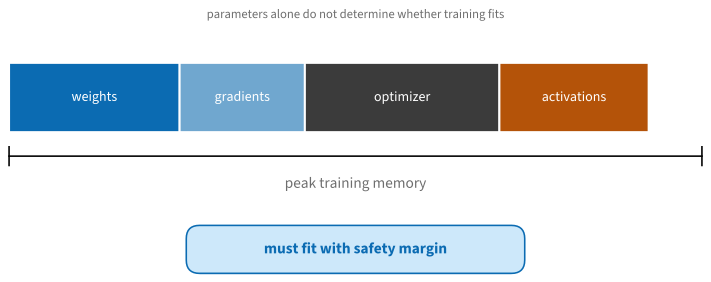
 0.1B params:    9.1 GiB
   1B params:   19.2 GiB
   7B params:   86.2 GiB
A 7B full fine-tune wants ~90 GiB — no consumer card holds it — while LoRA (freeze the weights, train small adapters, quantize the base to 4 bits) reduces the estimate for the same job to under 8 GiB. This allows some 7B adapter fine-tuning workloads to fit on a 16 GB card. For inference, apply the decode bound:
bandwidth_gbs = {"RTX 5070 Ti": 896, "RTX 3090 (used)": 936,
                 "RTX 5090": 1792, "RTX PRO 6000": 1792,
                 "DGX Spark": 273, "Strix Halo": 256,
                 "M4 Max": 546, "M3 Ultra": 819, "H100 SXM": 3350}
active_gb = 4.5   # 8B model at 4-bit, including cache traffic
for device, bw in sorted(bandwidth_gbs.items(), key=lambda kv: -kv[1]):
    print(f"{device:>16s}: <= {bw / active_gb:5.0f} tok/s")
H100 SXM: <= 744 tok/s
RTX 5090: <= 398 tok/s
RTX PRO 6000: <= 398 tok/s
RTX 3090 (used): <= 208 tok/s
RTX 5070 Ti: <= 199 tok/s
M3 Ultra: <= 182 tok/s
M4 Max: <= 121 tok/s
DGX Spark: <= 61 tok/s
Strix Halo: <= 57 tok/sRealized speed depends on kernels and workload, but the bound often predicts the ordering of bandwidth-limited systems. For example, systems with similar memory bandwidth can have similar decode rates despite large differences in compute throughput and price.
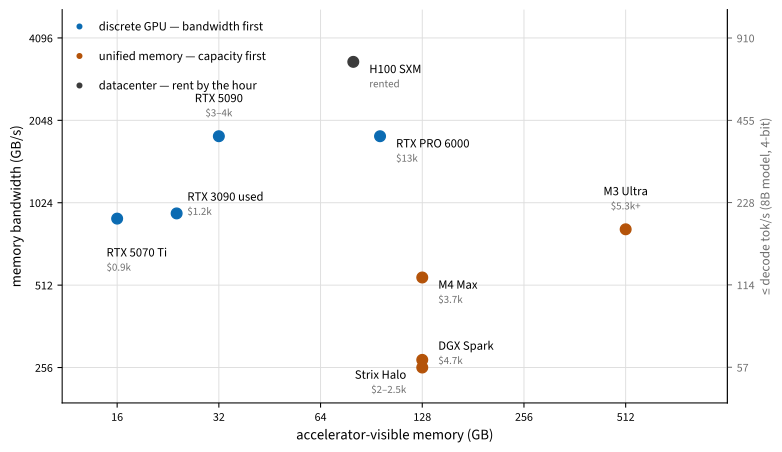
Figure 30.4.2 plots the July 2026 menu on those two axes. The machines split into two families — discrete GPUs (fast, small) and unified-memory systems (capacious, slow) — with the workstation-class RTX PRO 6000 bridging them at a price. Everything below walks this figure.
30.4.2 Training Boxes: Discrete NVIDIA GPUs
For many training and fine-tuning workloads, a discrete NVIDIA GPU offers high memory bandwidth and broad software support, including the frameworks in this book, FlashAttention, quantization kernels, and the CUDA stack common on rented machines.
30.4.2.1 RTX 5070 Ti: A 16 GB Training Reference
The RTX 5070 Ti (16 GB GDDR7 at 896 GB/s, 300 W, ~$900 in July 2026 against a $749 list) provides a useful lower-capacity reference for local training. Sixteen gigabytes runs every notebook in this book and supports some LoRA/QLoRA fine-tunes of 7–8B models comfortably, and diffusion fine-tuning at 1024² — while a 12 GB card excludes more model, sequence-length, and batch-size configurations. A complete quiet desktop around it (any 8-core CPU, 64 GB RAM, 1 TB NVMe, 850 W supply) cost about $2,000–2,500 in this snapshot. A comparable alternative is the used RTX 3090 (24 GB at 936 GB/s, ~$1,000–1,400 used in July 2026): more memory and similar bandwidth, but 350 W, no FP8/FP4 tensor cores, no warranty, and — a 2026 curiosity — a price that has been rising.
30.4.2.2 RTX 5090: A High-End Desktop Reference
The RTX 5090 (32 GB GDDR7 at 1.79 TB/s, 575 W, $3,000–4,300 street in July 2026 against a $1,999 list) is the fastest thing you can put in a desktop: datacenter-class bandwidth, Blackwell FP8/FP4 tensor cores, and enough memory for full fine-tunes of small models and LoRA on anything up to ~30B. The card also imposes system-level requirements: a 1200 W power supply with a native 16-pin connector, a chassis with sufficient airflow, and a circuit that can sustain the system’s load. Reported transient power can approach 660 W. A balanced build (Figure 30.4.3) pairs it with a current 16-core CPU, 64–128 GB of RAM, and fast NVMe scratch for datasets; in the 2026 memory market that totals $6,500–10,000 depending mostly on the RAM.
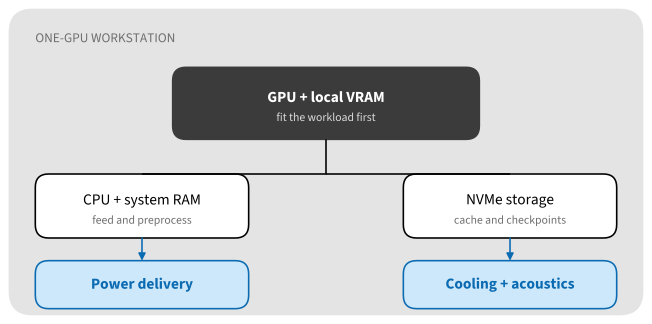
Multi-GPU consumer systems, often built from two to four used 3090s, can aggregate memory capacity. Data parallelism can operate over PCIe, but the platform must satisfy several constraints: consumer boards offer one full-bandwidth slot, so you want used Threadripper/EPYC platforms for lanes; power adds up (dual supplies are common); and no consumer card since the 3090 has NVLink, so communication-heavy tensor parallelism scales poorly. A short rental of an 8×GPU node (Section 30.3) can measure whether interconnect bandwidth limits the workload before purchasing a multi-GPU system.
30.4.3 Local Inference: the Unified-Memory Class
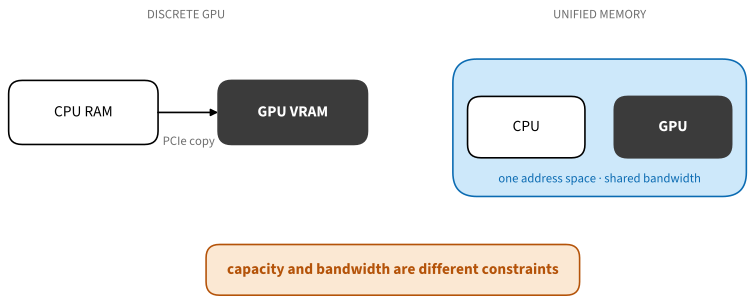
A second family of machines answers a different question: not “how fast can I train?” but “how large a model can I run at home?” These systems give the GPU direct access to a large pool of ordinary (LPDDR5X) memory — lots of capacity at a fraction of GDDR7/HBM bandwidth (Figure 30.4.4). The decode bound predicts the main trade-off: large models may fit but decode slowly, while mixture-of-experts models read only their active parameters for each token and can therefore decode faster than dense models of similar total size. The July 2026 menu:
| Machine | Memory | Bandwidth | ≈ Price | Notes |
|---|---|---|---|---|
| AMD Strix Halo mini-PC | 128 GB | 256 GB/s | $2,000–2,500 | Framework, Beelink, HP et al.; ROCm still maturing, Vulkan works |
| NVIDIA DGX Spark (GB10) | 128 GB | 273 GB/s | $3,500–4,700 | CUDA-native Blackwell; strong prefill; two units pair to 256 GB |
| Mac Studio M4 Max | up to 128 GB | 546 GB/s | from $2,500 | MLX ecosystem; quiet, efficient |
| Mac Studio M3 Ultra | up to 96 GB new | 819 GB/s | from $5,300 | 256/512 GB configs discontinued 2026; used units carry a premium |
| MacBook Pro M5 Max | up to 128 GB | 614 GB/s | from ~$3,500 | the same class, portable |
Measured reality (community llama-bench figures, mid-2026) matches the bandwidth ordering: the 120B-parameter MoE gpt-oss (~5B active per token) generates ~71 tok/s on an M3 Ultra, ~35 on a DGX Spark, ~40 on Strix Halo; a dense 70B at 4-bit limps at 5–12 tok/s on all of them. Where they differ sharply is prefill: the Spark’s Blackwell tensor cores chew through long prompts several times faster than Strix Halo or Apple’s GPU at the same decode speed — the compute-versus-bandwidth split of our opening formula in retail products. The software stack also matters: DGX Spark provides CUDA, Strix Halo supports Linux with a developing ROCm ecosystem, and Apple systems use MLX. Measure the relevant models because framework and kernel support can change the hardware-level ordering.
30.4.4 The Top End: Workstation Blackwell
The RTX PRO 6000 Blackwell packs 96 GB of GDDR7 at the 5090’s 1.79 TB/s — the upper-right bridge in Figure 30.4.2 — for about $13,000 list in July 2026 (it launched at $8,565; the memory crisis did the rest). A 300 W Max-Q variant with identical memory exists precisely so that four of them fit in one chassis: a 2× build (~$30–35k) runs unquantized 70B inference and full 70B fine-tunes; a 4× Threadripper PRO workstation (~$60k turnkey) holds 384 GB — DeepSeek-class MoE territory at 4-bit. One caveat defines the class: no NVLink (dropped from workstation cards after Ampere), so inter-card traffic rides PCIe 5.0 at ~64 GB/s per direction — nearly thirty times slower than each card’s local memory. Data- and pipeline-parallel workloads shrug; tensor parallelism pays. Against this budget, always price the alternative: $60k rents roughly 20,000 H100-hours (Table 30.3.1), and the break-even needs sustained, private, or interactive use to clear:
purchase_and_operation = 4200.0     # e.g. a 5090 box + 3y power
rental_per_productive_hour = 2.50   # H100-class marketplace rate
print(f"{purchase_and_operation / rental_per_productive_hour:.0f} "
      "productive hours to break even")
1680 productive hours to break evenThe relevant inputs are productive hours (a home box idles more than you think) — against which weigh privacy, zero queue time, and the real pedagogical value of hardware you can take apart.
30.4.5 Keeping Current
The specifications and prices above will change. The following sources can supply newer measurements, but their claims still require cross-checking. For build advice and street prices, r/LocalLLaMA (hardware megathreads) and the Level1Techs forum (multi-GPU build logs); for reviews of exactly this niche — Strix Halo boxes, DGX Spark, used servers — ServeTheHome; for apples-to-apples numbers, the community benchmark threads in llama.cpp discussions and llm-tracker.info; and for the durable reasoning about GPU choice, Tim Dettmers’ guide, last updated in 2023, for a workload-based method rather than current part recommendations. One warning: GPU search results are now thick with machine-generated pages quoting invented benchmarks — trust datasheets, named reviewers, and numbers that pass the decode-bound sanity check above.
30.4.6 Summary
- Buy the binding constraint: capacity gates what runs, bandwidth gates decode speed, compute gates training and prefill — and the decode bound (bandwidth ÷ active bytes) predicts generation speed to within a factor of two.
- Reference points, July 2026: an RTX 5070 Ti (~$900, 16 GB) represents a lower-capacity training system; an RTX 5090 (~$3–4k, 32 GB) represents a high-end desktop with substantial power and cooling requirements; used 3090s trade warranty and efficiency for memory capacity.
- Unified-memory machines (Strix Halo, DGX Spark, Apple silicon) trade bandwidth for capacity: large MoE models can fit and decode faster than dense models of similar total size, while prefill speed can distinguish systems with similar bandwidth.
- The RTX PRO 6000 class (96 GB at full bandwidth, no NVLink) bridges the two families for five figures; before spending it, price the rented equivalent.
- Date-stamp every price you rely on, and get current numbers from the community sources above rather than from search-engine filler.
30.4.7 Exercises
- Compute the decode bound for a 30B-A3B mixture-of-experts model (3B active parameters, 4-bit) on every machine in Table 30.4.1. Which become interactive (>20 tok/s)?
- Estimate LoRA fine-tuning memory for an 8B model on a 16 GB card: 4-bit frozen base, BF16 adapters at 1% of parameters, Adam. Does it fit, and what dominates?
- Spec a complete RTX 5070 Ti build at current local prices, then compute its break-even in hours against a rented 4090 from Table 30.3.1.
- Find this month’s used 3090 price and recompute its $/GB against the current 5070 Ti. Has the 2026 anomaly (used cards appreciating) persisted?