import torch
from pprint import pprint1.7 Documentation
A framework API contains more functions, classes, and arguments than any single text can cover, and it changes across releases. Effective use therefore depends on being able to find an operation, inspect its interface, read its documentation, and verify its behavior with a small example. This section demonstrates that procedure using Python and notebook tools.
The official reference and tutorial pages document the supported interface for each framework.
For PyTorch these are the API reference and the tutorials.
For TensorFlow these are the API reference and the tutorials.
For JAX these are the API reference and the tutorials.
For MXNet these are the API reference and the tutorials. One caveat: these pages document version 1.9.1 (the last release with hosted documentation), which foregrounds the legacy mx.nd interface, whereas this book uses the NumPy-style np/npx API of MXNet 2. For MXNet specifics, the in-notebook loop below is often the more reliable reference.
Many routine questions can be answered without leaving the notebook. The procedure has four steps: discover, inspect, read, and verify.
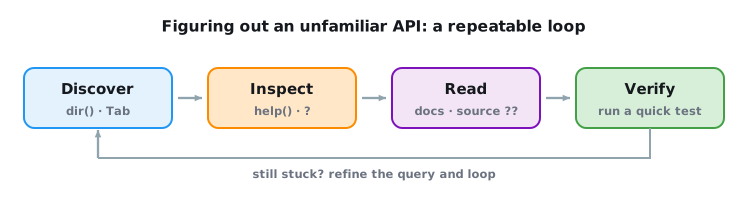
The examples below start from the standard import:
import tensorflow as tf
from pprint import pprint
import jax
from pprint import pprintfrom mxnet import np
from pprint import pprint1.7.1 Discovering What Exists: dir
When you know roughly where a tool should live but not what it is called, the dir function lists the names defined in a module. For instance, to inspect the available random-sampling tools (we print the first twenty names):
pprint([name for name in dir(torch.distributions)
        if not name.startswith('_')][:20], compact=True)
['AbsTransform', 'AffineTransform', 'Bernoulli', 'Beta', 'Binomial',
'CatTransform', 'Categorical', 'Cauchy', 'Chi2', 'ComposeTransform',
'ContinuousBernoulli', 'CorrCholeskyTransform',
'CumulativeDistributionTransform', 'Dirichlet', 'Distribution', 'ExpTransform',
'Exponential', 'ExponentialFamily', 'FisherSnedecor', 'Gamma']pprint([name for name in dir(tf.random)
if not name.startswith('_')][:20], compact=True)['Algorithm', 'Generator', 'all_candidate_sampler', 'categorical',
'create_rng_state', 'experimental', 'fixed_unigram_candidate_sampler',
'fold_in', 'gamma', 'get_global_generator',
'learned_unigram_candidate_sampler', 'log_uniform_candidate_sampler', 'normal',
'poisson', 'set_global_generator', 'set_seed', 'shuffle', 'split',
'stateless_binomial', 'stateless_categorical']pprint([name for name in dir(jax.random)
if not name.startswith('_')][:20], compact=True)['PRNGKey', 'ball', 'bernoulli', 'beta', 'binomial', 'bits', 'categorical',
'cauchy', 'chisquare', 'choice', 'clone', 'dirichlet', 'double_sided_maxwell',
'exponential', 'f', 'fold_in', 'gamma', 'generalized_normal', 'geometric',
'gumbel']pprint([name for name in dir(np.random)
if not name.startswith('_')][:20], compact=True)['beta', 'chisquare', 'choice', 'exponential', 'f', 'gamma', 'gumbel',
'integer_types', 'laplace', 'logistic', 'lognormal', 'multinomial',
'multivariate_normal', 'normal', 'pareto', 'power', 'rand', 'randint', 'randn',
'rayleigh']We can usually ignore names that begin and end with __ (Python’s special objects) or that start with a single _ (internal helpers). The remaining names already hint at what the module offers.
Here the names are distribution classes such as Bernoulli, Categorical, and Gamma; each can be instantiated and then sampled from. The Transform entries build new distributions by transforming existing ones.
Here we can spot samplers such as gamma, normal, and poisson, next to utilities like Generator and set_seed that manage the random state.
Here the names are samplers (bernoulli, beta, cauchy, exponential, gamma, …) plus PRNGKey, which creates the explicit random key that every JAX sampler takes.
Here almost every name is a sampler: draws from classical distributions (beta, gamma, multinomial, normal, …) alongside NumPy-style conveniences such as rand, randint, and randn.
In a notebook you can get the same list interactively, filtered as you type, by writing the module name followed by a dot and pressing Tab; this often locates a name quickly.
1.7.2 Reading the Signature: help, ?, and ??
Once you have a name, help prints its docstring: the arguments it takes, their defaults, what it returns, and often a short example. Let us look up the ones function, which we have used to build tensors:
help(torch.ones)Help on built-in function ones in module torch:
ones(...)
ones(*size, *, out=None, dtype=None, layout=torch.strided, device=None, requires_grad=False) -> Tensor
Returns a tensor filled with the scalar value `1`, with the shape defined
by the variable argument :attr:`size`.
Args:
size (int...): a sequence of integers defining the shape of the output tensor.
Can be a variable number of arguments or a collection like a list or tuple.
Keyword arguments:
out (Tensor, optional): the output tensor.
dtype (:class:`torch.dtype`, optional): the desired data type of returned tensor.
Default: if ``None``, uses a global default (see :func:`torch.set_default_dtype`).
layout (:class:`torch.layout`, optional): the desired layout of returned Tensor.
Default: ``torch.strided``.
device (:class:`torch.device`, optional): the desired device of returned tensor.
Default: if ``None``, uses the current device for the default tensor type
(see :func:`torch.set_default_device`). :attr:`device` will be the CPU
for CPU tensor types and the current CUDA device for CUDA tensor types.
requires_grad (bool, optional): If autograd should record operations on the
returned tensor. Default: ``False``.
Example::
>>> torch.ones(2, 3)
tensor([[ 1., 1., 1.],
[ 1., 1., 1.]])
>>> torch.ones(5)
tensor([ 1., 1., 1., 1., 1.])help(tf.ones)Help on function ones in module tensorflow.python.ops.array_ops:
ones(shape, dtype=tf.float32, name=None, layout=None)
Creates a tensor with all elements set to one (1).
See also `tf.ones_like`, `tf.zeros`, `tf.fill`, `tf.eye`.
This operation returns a tensor of type `dtype` with shape `shape` and
all elements set to one.
>>> tf.ones([3, 4], tf.int32)
<tf.Tensor: shape=(3, 4), dtype=int32, numpy=
array([[1, 1, 1, 1],
[1, 1, 1, 1],
[1, 1, 1, 1]], dtype=int32)>
Args:
shape: A `list` of integers, a `tuple` of integers, or a 1-D `Tensor` of
type `int32`.
dtype: Optional DType of an element in the resulting `Tensor`. Default is
`tf.float32`.
name: Optional string. A name for the operation.
layout: Optional, `tf.experimental.dtensor.Layout`. If provided, the result
is a [DTensor](https://www.tensorflow.org/guide/dtensor_overview) with the
provided layout.
Returns:
A `Tensor` with all elements set to one (1).help(jax.numpy.ones)Help on function ones in module jax.numpy:
ones(shape: Any, dtype: Union[str, type[Any], numpy.dtype, jax._src.typing.SupportsDType, NoneType] = None, *, device: jaxlib._jax.Device | jaxlib._jax.Sharding | None = None, out_sharding: jax.sharding.NamedSharding | jax.P | None = None) -> jax.Array
Create an array full of ones.
JAX implementation of :func:`numpy.ones`.
Args:
shape: int or sequence of ints specifying the shape of the created array.
dtype: optional dtype for the created array; defaults to float32 or float64
depending on the X64 configuration (see :ref:`default-dtypes`).
device: (optional) :class:`~jax.Device` or :class:`~jax.sharding.Sharding`
to which the created array will be committed. This argument exists for
compatibility with the :ref:`python-array-api`.
out_sharding: (optional) :class:`~jax.sharding.PartitionSpec` or :class:`~jax.NamedSharding`
representing the sharding of the created array (see `explicit sharding`_ for more details).
This argument exists for consistency with other array creation routines across JAX.
Specifying both ``out_sharding`` and ``device`` will result in an error.
Returns:
Array of the specified shape and dtype, with the given device/sharding if specified.
See also:
- :func:`jax.numpy.ones_like`
- :func:`jax.numpy.empty`
- :func:`jax.numpy.zeros`
- :func:`jax.numpy.full`
Examples:
>>> jnp.ones(4)
Array([1., 1., 1., 1.], dtype=float32)
>>> jnp.ones((2, 3), dtype=bool)
Array([[ True, True, True],
[ True, True, True]], dtype=bool)
.. _explicit sharding: https://docs.jax.dev/en/latest/parallel.htmlhelp(np.ones)Help on function ones in module mxnet.numpy:
ones(shape, dtype=None, order='C', device=None)
Return a new array of given shape and type, filled with ones.
This function currently only supports storing multi-dimensional data
in row-major (C-style).
Parameters
----------
shape : int or tuple of int
The shape of the empty array.
dtype : str or numpy.dtype, optional
An optional value type. Default is depend on your current default dtype.
When npx.is_np_default_dtype() returns False, default dtype is float32;
When npx.is_np_default_dtype() returns True, default dtype is float64.
Note that this behavior is different from NumPy's `ones` function where
`float64` is the default value.
order : {'C'}, optional, default: 'C'
How to store multi-dimensional data in memory, currently only row-major
(C-style) is supported.
device : Device, optional
Device context on which the memory is allocated. Default is
`mxnet.device.current_device()`.
Returns
-------
out : ndarray
Array of ones with the given shape, dtype, and device.
Examples
--------
>>> np.ones(5)
array([1., 1., 1., 1., 1.])
>>> np.ones((5,), dtype=int)
array([1, 1, 1, 1, 1], dtype=int64)
>>> np.ones((2, 1))
array([[1.],
[1.]])
>>> s = (2,2)
>>> np.ones(s)
array([[1., 1.],
[1., 1.]])The docstring tells us that ones creates a new tensor of the requested shape with every element set to 1. In a Jupyter notebook, two shortcuts make this quicker still: ones? opens the same docstring in a side pane, and ones?? additionally displays the function’s source code. When a docstring is terse or ambiguous, the source can clarify the implementation. Reading library source also reveals established usage idioms.
1.7.3 Verifying With a Quick Run
Docstrings can be terse, and they occasionally drift out of date. A small example can verify the behavior directly:
torch.ones(4)tensor([1., 1., 1., 1.])tf.ones(4)<tf.Tensor: shape=(4,), dtype=float32, numpy=array([1., 1., 1., 1.], dtype=float32)>jax.numpy.ones(4)Array([1., 1., 1., 1.], dtype=float32)np.ones(4)array([1., 1., 1., 1.])The result has the documented shape and values. Making this discover → inspect → read → verify loop a habit will carry you through the unfamiliar corners of any library, long after the specific functions in this book have changed.
Coding assistants can propose an API call for a question such as “how do I sample from a normal distribution in this framework?” Treat the result as an unverified candidate that still goes through the loop above. Glance at the signature with help or ?, run a small example, and accept the suggestion only once it survives both.
1.7.4 Summary
For an unfamiliar operation, discover candidate names, inspect the signature, read the relevant documentation, and verify the behavior with the smallest run that exposes shapes, dtypes, and values. This procedure remains valid as library APIs change and applies equally to suggestions from search or coding assistants.
1.7.5 Exercises
- [code] Discovering uniform sampling. Use
diron your framework’s random-number module to find the routine that samples from a uniform distribution. Read its signature withhelp(or?), then call it to draw a \(3 \times 3\) tensor and confirm the values lie in \([0, 1)\). - [code] Reducing along an axis. You want to reduce a tensor along a single axis but cannot remember the keyword. Look up your framework’s
sum(orreduce_sum) withhelp, identify the argument that selects the axis, and verify on a \(2 \times 3\) tensor that summing over each axis gives the shape you predicted. - [code] Checking a coding assistant’s answer. Ask a coding assistant how to concatenate two tensors along a new axis in your framework. Then run its answer through the discover → inspect → read → verify loop: does the suggested function exist (
dir), does its signature match the claim (help/?), and does a tiny example do what you expect? - [code] Reading the source. Pick a function you have used in this chapter whose docstring does not fully explain its behavior on an edge case you care about, for example what
reshapedoes when a dimension does not evenly divide the requested shape. Use??or your editor’s go-to-definition to read its source, find the line that decides the edge case, and confirm your reading with a small example. - [code] A confidently wrong assistant. Ask a coding assistant for a function that performs an operation your framework does not provide under a single name, for example sorting a tensor’s axes by size. If it names a function, check with
dirorhasattrwhether that function exists. Describe in one or two sentences what about the answer would have fooled you had you skipped the discover step.