import numpy as np

gpu = ["RTX 4090", "A100 80GB", "H100"]
gpu_per_hour = np.array([0.40, 1.50, 2.50])   # marketplace, July 2026
relative_speed = np.array([1.0, 1.6, 3.0])    # measure for your workload!
setup_hours = np.array([0.5, 0.5, 0.5])
storage_and_egress = np.array([2.0, 2.0, 2.0])
engineer_per_hour = 60.0

wall_hours = 8.0 / relative_speed
invoice = (wall_hours + setup_hours) * gpu_per_hour + storage_and_egress
complete = invoice + setup_hours * engineer_per_hour
for row in zip(gpu, np.round(wall_hours, 1), np.round(invoice, 2),
               np.round(complete, 2)):
print(row)30.3 Cloud Computing
A workload may exceed the hosted-notebook limits described in Section 30.2 because preprocessing takes many hours, the model requires 80 GB of accelerator memory, or an experiment needs several GPUs. Renting provides access to larger configurations without purchasing them. The dated mid-2026 examples below show substantial price variation across providers; current prices must be checked before use. The book’s notebooks stay below 8 GB of GPU memory, so a 16 GB rentable GPU has adequate capacity. Full fine-tuning, long-context serving, and pretraining increase both memory requirements and cost.
Effective cloud use requires matching a machine to the workload and treating the instance as disposable. Results must be copied to durable storage before the instance is deleted.
30.3.1 The Rental Market
30.3.1.1 Three Tiers of Provider
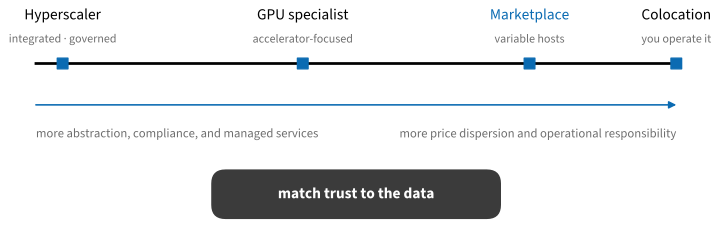
- Hyperscalers — AWS, Google Cloud, Microsoft Azure — sell GPUs embedded in a full cloud: identity management, virtual networks, managed storage, and every adjacent service. You pay for that integration; their on-demand GPU prices are consistently the highest, and the largest instances often require quota requests or sales contact. They are often appropriate when data already resides in that cloud, when compliance requirements apply, or when training is part of a larger managed system. Google additionally rents TPUs (a v5e chip for about $1.20 per hour in this snapshot), which can run the JAX code in this book.
- GPU specialists — Lambda, CoreWeave, Crusoe, Nebius, Voltage Park, Together, and others — do one thing: accelerators with fast interconnect and ML-ready images. Self-serve H100s run $2–4.30 per hour (July 2026); Lambda and Nebius are fully self-serve, while CoreWeave publishes prices but onboards through sales. This tier suits substantial training runs that do not require a hyperscaler’s surrounding services.
- Marketplaces — Vast.ai, RunPod, TensorDock, Prime Intellect, and the auction-style SF Compute — aggregate machines from many independent operators, including consumer GPUs that the large clouds do not carry. These marketplaces often list the lowest hourly prices: an RTX 4090 for $0.30–0.60 per hour, an H100 from about $1.50. The catch is variance: host reliability, disk speed, and network quality differ per listing, and your code runs on a stranger’s machine — fine for coursework and public data, inappropriate for anything sensitive unless the platform’s vetted tier is used.
30.3.1.2 A Dated Price Snapshot
Prices change quickly and vary by region, availability, commitment, and host. Treat the following July 2026 snapshot as an illustration rather than a catalog, and obtain current quotes before making a purchasing decision:
| Provider (tier) | Cheap GPU option | ≈ $/hr | 1× H100 80 GB ≈ $/hr |
|---|---|---|---|
| Vast.ai (marketplace) | RTX 4090 24 GB | 0.35 | 1.50–1.90 |
| RunPod (marketplace) | RTX 4090 24 GB | 0.35–0.70 | 2.90 (vetted hosts) |
| Prime Intellect (marketplace) | RTX 4090 24 GB | 0.32 | 1.49 |
| Lambda (specialist) | A100 40 GB | 1.99 | 3.99–4.29 |
| Nebius (specialist) | RTX PRO 6000 48 GB | 1.80 | 3.85 |
| Voltage Park (specialist) | H100 (only SKU) | 1.99 | 1.99 |
| AWS (hyperscaler) | L4 24 GB (g6) | 0.80 | 6.88 (p5) |
| Azure (hyperscaler) | A10 24 GB | 1.43 | 6.98 |
| Google Cloud (hyperscaler) | L4 24 GB | 0.70 | ≈ 11 (A3) |
Three qualifications matter. First, providers may offer account-, student-, or startup-specific credits. Eligibility and amounts change, so verify them on the provider’s official program page rather than budgeting from this snapshot. Second, multi-GPU nodes price linearly per GPU on most providers, but the interconnect does not: an 8×H100 machine with NVLink is a qualitatively different tool from eight PCIe cards, and communication-heavy training (Section 30.6) will feel the difference. Third, newer is not always cheaper per unit of work: B200-class instances ($6–14 per GPU-hour) only pay off when you exploit their memory and FP8/FP4 throughput.
30.3.1.3 Cost per Result, Not per Hour
The hourly price is the most visible term of a larger sum: setup time, idle time while you debug, storage that keeps billing after the run, data egress, and engineering time. A faster, more expensive GPU can reduce the cost per completed experiment. The model below compares an inexpensive marketplace card with two datacenter GPUs for the same eight-hour job on the slowest card. Rerun it with workload-specific assumptions:
('RTX 4090', np.float64(8.0), np.float64(5.4), np.float64(35.4))
('A100 80GB', np.float64(5.0), np.float64(10.25), np.float64(40.25))
('H100', np.float64(2.7), np.float64(9.92), np.float64(39.92))
The hourly invoice favors the inexpensive card, but including engineering time makes the totals similar. If slower iteration adds another debugging round, the faster card can cost less overall. Reliability therefore belongs in the cost model. As an order-of-magnitude example, a LoRA fine-tune of a 7B model may take hours on one consumer GPU, whereas pretraining a small language model can require thousands of GPU-hours. Estimate the workload before comparing small differences in hourly price.
Two cost traps deserve their own warnings:
- Spot and interruptible capacity may be substantially discounted and can suit jobs that checkpoint and resume cleanly (Section 30.6). It is the wrong discount for an interactive session or an uncheckpointed run — eviction notice can be as short as a few seconds on marketplace spot tiers. Test recovery before the long run, not during it.
- Egress fees. Hyperscalers charge roughly $0.09–0.12 per GB to move data out. Re-downloading a 140 GB checkpoint daily costs more per month than many GPUs. Keep data and compute in the same region, and prefer providers with free egress (most marketplaces) when your workflow moves big artifacts around.
30.3.2 Working on a Rented Machine
30.3.2.1 Boot, Connect, Verify
Start from the provider’s current deep-learning image, with drivers, CUDA, and the container runtime preinstalled. A bare OS image requires additional setup that must also be reproduced later. Connect with the SSH-tunnel pattern of Section 30.1 (the same two commands work on every provider), or use VS Code Remote SSH. Run long jobs under tmux so an SSH disconnect does not kill training, and verify the machine before trusting it with a long run:
nvidia-smi                 # driver ok? expected GPU? memory free?
df -h                      # scratch disk has room for data + checkpoints?
python -c "import torch; print(torch.cuda.get_device_name(0))"
A short smoke test—one batch through the model and one checkpoint written and read back—can detect problems that instance-health indicators omit: broken drivers, full disks, read-only mounts, and datasets that stream too slowly to keep the GPU busy.
30.3.2.2 Compute Is Disposable, Results Are Not
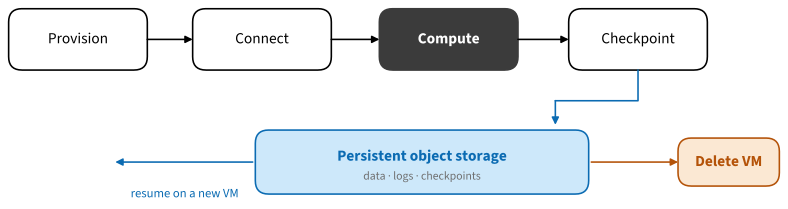
The workflow in Figure 30.3.2 separates the lifetime of the machine from the lifetime of your work. Code is stored in Git and cloned onto the instance; data and checkpoints sync to durable object storage (S3, GCS, or the provider’s volume product) on a schedule the job controls; the instance itself can then be preempted, crashed, or deleted without losing more than the last checkpoint interval. This is not merely a safety practice — it enables recovery from preemption or host failure.
When the experiment ends, tear down everything that bills: the instance, its disks and snapshots, reserved IP addresses, and stale buckets. Set a billing alert on day one; a forgotten idle GPU costs the same as a busy one, and quota limits are the only thing standing between a leaked credential and a very large invoice.
30.3.3 Summary
- Every notebook in this book fits in 8 GB of GPU memory, so the cheapest rentable GPUs suffice; LLM-scale work is what climbs the price ladder.
- The market has three tiers — hyperscalers, GPU specialists, and marketplaces — with a substantial price spread for the same GPU and different levels of integration, reliability, and operational trust.
- Compare cost per completed result, not per hour: include setup, idle time, storage, egress, and your own time.
- Spot capacity can reduce the cost of checkpointed, restartable jobs but is unsuitable for some interactive or uncheckpointed work; egress fees can make repeated artifact transfers expensive.
- Treat instances as disposable: provider image, SSH tunnel,
tmux, checkpoints to durable storage, then delete every billable resource.
30.3.4 Exercises
- Price a fine-tuning job you care about on three providers from Table 30.3.1 using cost per completed run. State the date and your speed assumptions, then check how prices have moved since this table was written.
- Take whichever training notebook of this book you ran most recently and measure its actual GPU memory high-water mark. Which entries of Table 30.3.1 could run it?
- Simulate an interruption: start a checkpointed training run, kill the process mid-epoch, and resume on a fresh machine from object storage. Time the recovery and identify what you forgot to save.
- Draw the trust boundary for (a) a marketplace host processing a public dataset and (b) a hyperscaler processing medical records. What changes?