GPUs are fast; Python is slow. If every tensor op had to wait for the GPU before Python proceeds to the next line, GPU utilization would be terrible.
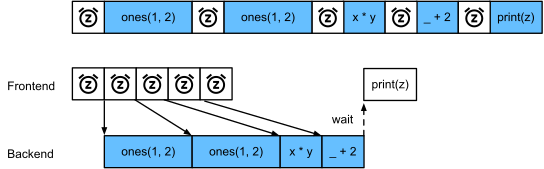
The fix: deep-learning frameworks run asynchronously. The Python frontend dispatches an op (returns immediately) and the C++/CUDA backend queues it on a stream. Subsequent ops join the queue. The CPU and GPU work in parallel, and synchronization happens implicitly when you actually need a value (e.g. .numpy(), printing, conversion).
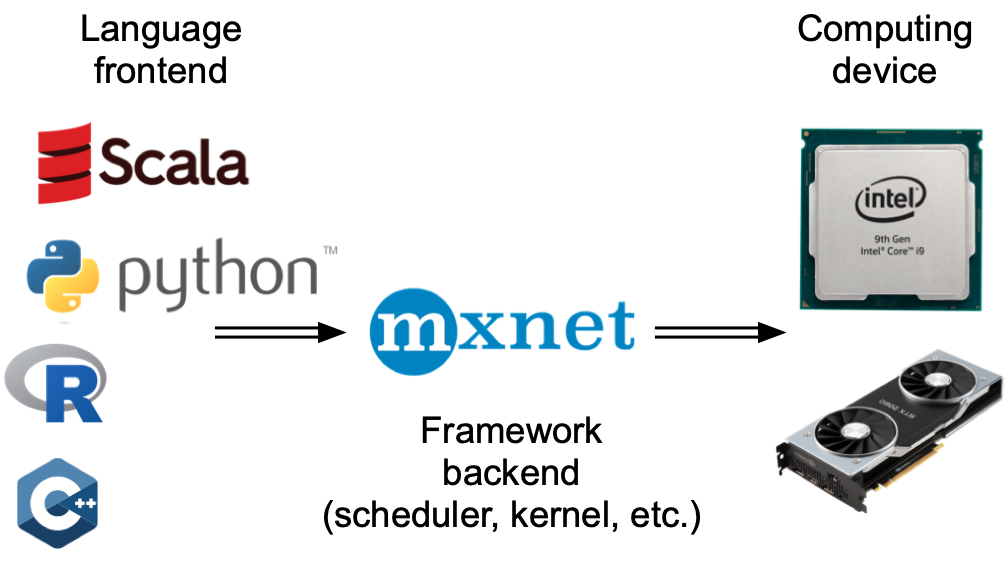
Programming language frontends and DL framework backends.
This deck shows how to measure async behavior, where it backfires, and how to write code that benefits from it.
Asynchrony in action
Time the same computation in pure NumPy vs the framework. NumPy is synchronous; the framework op returns immediately and the GPU runs in the background:
from d2l import tensorflow as d2limport numpyimport tensorflow as tf
# Warmup for GPU computationwith tf.device('/GPU:0'): a = tf.random.normal(shape=(1000, 1000)) b = tf.linalg.matmul(a, a)_ = b.numpy() # Force synchronization for warmupwith d2l.Benchmark('numpy'):for _ inrange(10): a = numpy.random.normal(size=(1000, 1000)) b = numpy.dot(a, a)with d2l.Benchmark('tensorflow'):for _ inrange(10):with tf.device('/GPU:0'): a = tf.random.normal(shape=(1000, 1000)) b = tf.linalg.matmul(a, a)
numpy: 0.3730 sec
tensorflow: 0.0061 sec
Asynchrony (cont.)
with d2l.Benchmark():for _ inrange(10):with tf.device('/GPU:0'): a = tf.random.normal(shape=(1000, 1000)) b = tf.linalg.matmul(a, a) _ = b.numpy() # Force synchronization
Done: 0.0132 sec
x = tf.ones((1, 2))y = tf.ones((1, 2))z = x * y +2z
The small dispatch time is not the real compute time until a synchronization point forces Python to wait for the backend queue to drain.
The dependency graph
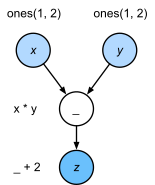
The backend tracks dependencies between queued ops; ops without dependencies can run in parallel on different streams:
Backend tracks dependencies between graph nodes.
Frontend ↔︎ backend
Python frontend hands ops to a C++/CUDA backend; CUDA stream runs them asynchronously.
Barriers
Anything that needs a value forces a barrier — Python waits until the GPU catches up. Common offenders: printing intermediate values, .item(), .numpy(), control flow based on a tensor value:
with d2l.Benchmark('numpy conversion'):with tf.device('/GPU:0'): b = tf.linalg.matmul(a, a) _ = b.numpy() # Blocks until GPU is donewith d2l.Benchmark('scalar conversion'):with tf.device('/GPU:0'): b = tf.linalg.matmul(a, a) _ =float(tf.reduce_sum(b)) # Also blocks
Avoid unnecessary barriers. Don’t print(loss) inside the training loop unless you need it. Don’t .cpu().numpy() mid-batch. Save metrics to a list of tensors and reduce later:
x = tf.ones((1, 2))with d2l.Benchmark('synchronous (eager + .numpy() barrier)'):for _ inrange(10000): y = x +1 _ = y.numpy() # Forces synchronization after every opwith d2l.Benchmark('asynchronous (eager, single sync at end)'):for _ inrange(10000): y = x +1 _ = y.numpy() # Single sync at the end@tf.functiondef add_loop(x, n):for _ in tf.range(n): x = x +1return x# Warm up the tf.function trace_ = add_loop(x, tf.constant(1))with d2l.Benchmark('tf.function (compiled graph)'): y = add_loop(x, tf.constant(10000)) _ = y.numpy()
synchronous (eager + .numpy() barrier): 1.6383 sec
asynchronous (eager, single sync at end): 0.6561 sec
tf.function (compiled graph): 0.9407 sec
Recap
Frontend dispatches ops; backend queues and executes asynchronously. CPU and GPU overlap.
Synchronization is implicit on .item(), .numpy(), printing, conversion to NumPy.
Reading values mid-loop forces barriers and stalls the pipeline. Buffer metrics; reduce at epoch boundaries.
TF needs @tf.function to actually be async; PyTorch and MXNet are async by default.