Object-Oriented Design for Implementation

Dive into Deep Learning · §2.2

Write the training loop once
let every new model and dataset be a subclass · Module · DataModule · Trainer.

One loop, written once

Motivation

Almost every model in this book runs the same loop: load a batch, forward, compute loss, update, repeat.

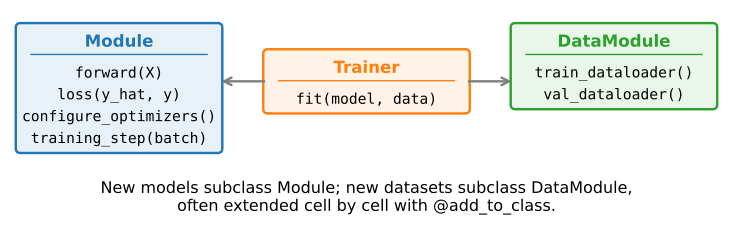
Rewrite that loop per model and one tweak (gradient clipping, an LR schedule) means touching every chapter. Instead, factor it into three collaborating classes:

Module is the model · DataModule is the data · Trainer owns the loop. New work = a new subclass.
01

Notebook-friendly utilities

three helpers that make classes teachable

Define a class, then grow it

Utilities

A notebook wants short cells, so declare the shell first and instantiate it…

class A:
    def __init__(self):
        self.b = 1

a = A()

…then attach a method later with @add_to_class, which setattrs it onto the class, so the bound method sees self:

@add_to_class(A)
def do(self):
    print('Class attribute "b" is', self.b)

a.do()
Class attribute "b" is 1

add_to_class, in three lines

Utilities

The whole trick: a decorator that writes the function onto a class object. Python’s class namespace is mutable, so this works even on a class that already has instances.

def add_to_class(Class):
    """Register functions as methods in created class."""
    def wrapper(obj):
        setattr(Class, obj.__name__, obj)
        return obj
    return wrapper

We use it throughout the book to split one class across several cells, each next to the prose that explains it.

Stop hand-copying constructor args

Utilities

Every __init__ is full of self.lr = lr; self.n = n; .... The HyperParameters mixin captures the caller’s arguments and saves them as attributes automatically:

# Call the fully implemented HyperParameters class saved in d2l
class B(d2l.HyperParameters):
    def __init__(self, a, b, c):
        self.save_hyperparameters(ignore=['c'])
        print('self.a =', self.a, 'self.b =', self.b)
        print('There is no self.c =', not hasattr(self, 'c'))

b = B(a=1, b=2, c=3)
self.a = 1 self.b = 2
There is no self.c = True

One save_hyperparameters() call and self.a, self.b exist; an ignore= list opts arguments out. (Full implementation in the Utilities appendix.)

ProgressBoard: the loss curve, animated

Utilities

draw(x, y, label) records a point and the curve grows as training runs; every_n thins a noisy series by plotting the average of the last n values:

board = d2l.ProgressBoard('x')
for x in np.arange(0, 10, 0.1):
    board.draw(x, np.sin(x), 'sin', every_n=2)
    board.draw(x, np.cos(x), 'cos', every_n=10)
board.flush()  # wait for the queued points, then render the final figure
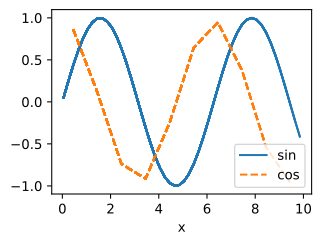
Why draw merely schedules the point (and flush() waits for the queue) is the point of the next slide.

Watching the loss live should be impossible

Utilities · compilation & async

Frameworks earn their speed by compiling the training step into a graph and letting the device run ahead of Python. That imposes two rules:

  • A compiled step must be pure: a print or plot inside it cannot be captured by the compiler, forcing a fallback to slower eager execution.
  • The instant Python asks for a concrete number, it must block until the device catches up, stalling the very pipeline we built.

So every naïve “plot the loss each batch” either breaks the compiled graph or drains the device pipeline. Real-time monitoring and efficiency seem to be at war.

Resolution: queue now, render elsewhere

Utilities · compilation & async

ProgressBoard decouples the two: draw hands the value to a queue and returns at once; a background thread does the device-to-host copy and the slow matplotlib rendering at its own pace, dropping points if it falls behind, since a live curve needs only a few updates per second.

The training loop stays compiled, the device stays busy, and the loss still falls before your eyes.

The pattern to remember, book-wide: keep the hot path pure and compiled; push logging, plotting, and checkpointing off to the side.

02

The three base classes

Module · DataModule · Trainer

Module: the same contract, in NNX

Base classes

An NNX module is an ordinary Python object that owns its parameters. The contract is the same as everywhere else:

  • forward / __call__: the prediction.
  • training_step: loss on one batch; the trainer differentiates it with nnx.value_and_grad with respect to the module itself.
  • configure_optimizers: the optax optimizer, wrapped in nnx.Optimizer.

JAX still traces pure functions under the hood — NNX splits the module into structure and state at the jit boundary, so we never have to.

DataModule: where batches come from

Base classes

A DataModule serves a train and a validation loader, both through one get_dataloader(train) hook that subclasses override. This is the entire base class:

class DataModule(d2l.HyperParameters):
    """The base class of data."""
    def __init__(self, root='../data', num_workers=4):
        self.save_hyperparameters()

    def get_dataloader(self, train):
        raise NotImplementedError

    def train_dataloader(self):
        return self.get_dataloader(train=True)

    def val_dataloader(self):
        return self.get_dataloader(train=False)

A loader is a generator yielding one batch at a time, fed straight into Module.training_step.

Trainer: owning state, the NNX way

Base classes

NNX modules own parameters, random-number streams, and mutable collections. fit creates an optimizer over the model graph and two lightweight views for training and validation modes:

Same fit(model, data) contract; nnx.jit follows the model and optimizer graphs through each compiled step.

tx = model.configure_optimizers()
self.optim = nnx.Optimizer(
    model, tx, wrt=nnx.Param)
self.train_model = nnx.view(
    model, deterministic=False, ...)
self.val_model = nnx.view(
    model, deterministic=True, ...)

Recap

Wrap-up

  • Three classes scaffold every model: Module (the model), DataModule (the data), Trainer (the loop).
  • New model or dataset = a subclass; the loop is written once.
  • add_to_class splits a class across notebook cells; HyperParameters kills __init__ boilerplate.
  • ProgressBoard plots the loss live yet never blocks: keep the hot path pure and compiled; push logging off to the side, a theme that recurs all book.
  • Watch the framing: NNX keeps JAX transformations functional while presenting the model, variables, and optimizer as explicit object graphs.