Semantic Segmentation and the Dataset

Semantic Segmentation Data

Semantic segmentation assigns a class label to every pixel, not just to the image as a whole. Output shape = input shape; output channels = number of classes.

Two related tasks to keep distinct:

  • Image segmentation — group pixels by similarity (no semantic labels). Pure clustering.
  • Instance segmentation — like semantic, but separate instances of the same class get different labels (Mask R-CNN).
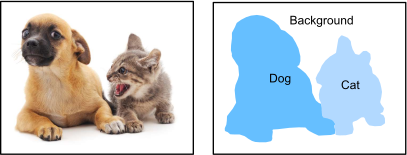
Semantic segmentation: pixel-level labels for dog, cat, background.

This deck sets up the PASCAL VOC 2012 dataset and the data plumbing for FCN training (next deck).

Downloading VOC 2012

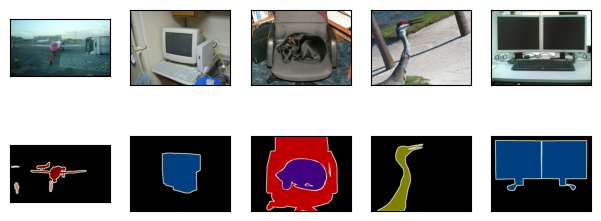
The download gives paired directories: JPEG images and segmentation masks. The important invariant is one RGB mask per input image, with matching spatial dimensions.

%matplotlib inline
from d2l import jax as d2l
import jax
from jax import numpy as jnp
from flax import linen as nn
import optax
import numpy as np
import os
d2l.DATA_HUB['voc2012'] = (d2l.DATA_URL + 'VOCtrainval_11-May-2012.tar',
                           '4e443f8a2eca6b1dac8a6c57641b67dd40621a49')

voc_dir = d2l.download_extract('voc2012', 'VOCdevkit/VOC2012')

Reading images and labels

Inputs are RGB images; labels are RGB images too — the class is encoded in the color, not in a 1-channel id tensor:

def read_voc_images(voc_dir, is_train=True):
    """Read all VOC feature and label images."""
    from PIL import Image
    txt_fname = os.path.join(voc_dir, 'ImageSets', 'Segmentation',
                             'train.txt' if is_train else 'val.txt')
    with open(txt_fname, 'r') as f:
        images = f.read().split()
    features, labels = [], []
    for i, fname in enumerate(images):
        features.append(np.array(Image.open(os.path.join(
            voc_dir, 'JPEGImages', f'{fname}.jpg'))))
        labels.append(np.array(Image.open(os.path.join(
            voc_dir, 'SegmentationClass', f'{fname}.png')).convert('RGB')))
    return features, labels

train_features, train_labels = read_voc_images(voc_dir, True)
n = 5
imgs = train_features[:n] + train_labels[:n]
d2l.show_images(imgs, 2, n);
Color → class index

Build a lookup table from the 21 RGB triplets to class indices 0–20. After conversion, each label pixel is an integer target for cross-entropy:

VOC_COLORMAP = [[0, 0, 0], [128, 0, 0], [0, 128, 0], [128, 128, 0],
                [0, 0, 128], [128, 0, 128], [0, 128, 128], [128, 128, 128],
                [64, 0, 0], [192, 0, 0], [64, 128, 0], [192, 128, 0],
                [64, 0, 128], [192, 0, 128], [64, 128, 128], [192, 128, 128],
                [0, 64, 0], [128, 64, 0], [0, 192, 0], [128, 192, 0],
                [0, 64, 128]]


VOC_CLASSES = ['background', 'aeroplane', 'bicycle', 'bird', 'boat',
               'bottle', 'bus', 'car', 'cat', 'chair', 'cow',
               'diningtable', 'dog', 'horse', 'motorbike', 'person',
               'potted plant', 'sheep', 'sofa', 'train', 'tv/monitor']
def voc_colormap2label():
    """Build the mapping from RGB to class indices for VOC labels."""
    colormap2label = np.zeros(256 ** 3, dtype=np.int32)
    for i, colormap in enumerate(VOC_COLORMAP):
        colormap2label[
            (colormap[0] * 256 + colormap[1]) * 256 + colormap[2]] = i
    return colormap2label


def voc_label_indices(colormap, colormap2label):
    """Map any RGB values in VOC labels to their class indices."""
    colormap = colormap.astype(np.int32)
    idx = ((colormap[:, :, 0] * 256 + colormap[:, :, 1]) * 256
           + colormap[:, :, 2])
    return colormap2label[idx]
y = voc_label_indices(train_labels[0], voc_colormap2label())
y[105:115, 130:140], VOC_CLASSES[1]
(array([[0, 0, 0, 0, 0, 0, 0, 0, 0, 1],
        [0, 0, 0, 0, 0, 0, 0, 1, 1, 1],
        [0, 0, 0, 0, 0, 0, 1, 1, 1, 1],
        [0, 0, 0, 0, 0, 1, 1, 1, 1, 1],
        [0, 0, 0, 0, 0, 1, 1, 1, 1, 1],
        [0, 0, 0, 0, 1, 1, 1, 1, 1, 1],
        [0, 0, 0, 0, 0, 1, 1, 1, 1, 1],
        [0, 0, 0, 0, 0, 1, 1, 1, 1, 1],
        [0, 0, 0, 0, 0, 0, 1, 1, 1, 1],
        [0, 0, 0, 0, 0, 0, 0, 0, 1, 1]], dtype=int32),
 'aeroplane')

Crop, not resize

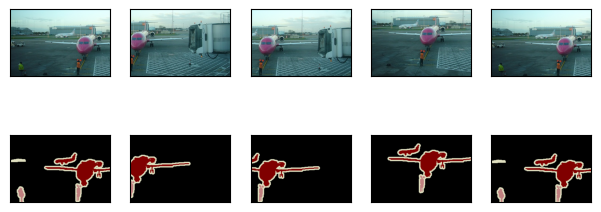
Standard image preprocessing resizes — but resizing the label would interpolate class IDs, which is meaningless. Use random crop on both image and label, with the same random window:

def voc_rand_crop(feature, label, height, width):
    """Randomly crop both feature and label images."""
    # feature and label are HWC numpy arrays
    h, w = feature.shape[0], feature.shape[1]
    top = np.random.randint(0, h - height + 1)
    left = np.random.randint(0, w - width + 1)
    feature = feature[top:top+height, left:left+width, :]
    label = label[top:top+height, left:left+width, :]
    return feature, label
imgs = []
for _ in range(n):
    imgs += voc_rand_crop(train_features[0], train_labels[0], 200, 300)
d2l.show_images(imgs[::2] + imgs[1::2], 2, n);
Custom Dataset class

Drops images smaller than the crop size; converts RGB labels to class-index tensors during __getitem__:

class VOCSegDataset:
    """A customized dataset to load the VOC dataset."""

    def __init__(self, is_train, crop_size, voc_dir):
        self.rgb_mean = np.array([0.485, 0.456, 0.406])
        self.rgb_std = np.array([0.229, 0.224, 0.225])
        self.crop_size = crop_size
        features, labels = read_voc_images(voc_dir, is_train=is_train)
        self.features = [self.normalize_image(feature)
                         for feature in self.filter(features)]
        self.labels = self.filter(labels)
        self.colormap2label = voc_colormap2label()
        print('read ' + str(len(self.features)) + ' examples')

    def normalize_image(self, img):
        return (img.astype(np.float32) / 255 - self.rgb_mean) / self.rgb_std

    def filter(self, imgs):
        return [img for img in imgs if (
            img.shape[0] >= self.crop_size[0] and
            img.shape[1] >= self.crop_size[1])]

    def __getitem__(self, idx):
        feature, label = voc_rand_crop(self.features[idx], self.labels[idx],
                                       *self.crop_size)
        return (jnp.array(feature.transpose(2, 0, 1)),
                jnp.array(voc_label_indices(label, self.colormap2label)))

    def __len__(self):
        return len(self.features)

Train + val loaders

The printed shapes should show image tensors with a channel axis, but label tensors with only (batch, H, W). The label has no channel dimension because each pixel stores one class id.

crop_size = (320, 480)
voc_train = VOCSegDataset(True, crop_size, voc_dir)
voc_test = VOCSegDataset(False, crop_size, voc_dir)
read 1114 examples
read 1078 examples
batch_size = 64
num_examples = len(voc_train) // batch_size * batch_size
indices = np.random.permutation(len(voc_train))[:num_examples]
batch = [voc_train[i] for i in indices[:batch_size]]
X = jnp.stack([b[0] for b in batch])
Y = jnp.stack([b[1] for b in batch])
print(X.shape)
print(Y.shape)
(64, 3, 320, 480)
(64, 320, 480)

Reusable loader factory

def load_data_voc(batch_size, crop_size):
    """Load the VOC semantic segmentation dataset."""
    voc_dir = d2l.download_extract('voc2012', os.path.join(
        'VOCdevkit', 'VOC2012'))
    train_dataset = VOCSegDataset(True, crop_size, voc_dir)
    test_dataset = VOCSegDataset(False, crop_size, voc_dir)
    train_iter = d2l.ArrayDataLoader(train_dataset, batch_size=batch_size,
                                     shuffle=True, drop_last=True)
    test_iter = d2l.ArrayDataLoader(test_dataset, batch_size=batch_size,
                                    drop_last=True)
    return train_iter, test_iter

Recap

  • Semantic segmentation = per-pixel classification; output shape matches input shape.
  • VOC labels encode classes as RGB triplets; build a lookup table to convert.
  • Resize is wrong for label maps; use random crop with the same window for image and label.
  • Output of this deck: a clean (image, label) loader the next deck (FCN) trains on.